Here’s a situation we usually struggle with: you need a quick video, for a social media post, a team announcement, or to explain a new idea. You need it now. But you don’t have a camera crew, a fancy microphone, or the hours it takes to edit.
For years at Feisworld Media, we’ve spent countless hours and thousands of dollars creating professional videos (like our $150k+ documentary on Amazon Prime Video). It’s a huge part of what we do. But I’ve always wished for a tool that could make the simple stuff, well, simpler. A way to create a clean, professional-looking video as easily as writing an email.
That’s the promise of AI video generation. And Synthesia has a free video generator tool that lets anyone try it.
I wanted to see if it lived up to the hype. Could it really turn a simple line of text into a high-quality video in just a few minutes? I put it to the test.
This guide will walk you through exactly how Synthesia’s Free AI Video Generator works, what you can do with it, and how you can create your first AI video today, for free.
What is Synthesia Free AI Video Generator?
Think of it as a magic video-making machine on a website.
Synthesia’s Free AI Video Generator is a simple text-to-video tool that takes your words and turns them into a complete video. You don’t need any software or technical skills. You just provide the text, and depending on your input method, the AI:
- Creates a professional video draft complete with a lifelike AI avatar to present your message, natural-sounding voiceover in any language; or
- Creates a video clip based on your input prompt, powered by Sora 2, which you can refine and regenerate
The best part? The tool gives you four easy ways to start, so you can begin with whatever you have, even if it’s just a simple idea.
This AI video maker stands out because it removes all the friction from video production. No filming, no editing software to learn, no expensive equipment, just your message and a few clicks.
How to Make an AI-Generated Video (Step-by-Step)
I was shocked by how fast this was. The whole process took me less than three minutes. Here’s a simple breakdown of the steps so you can follow along.
1. Start with an Idea, Script, or Link
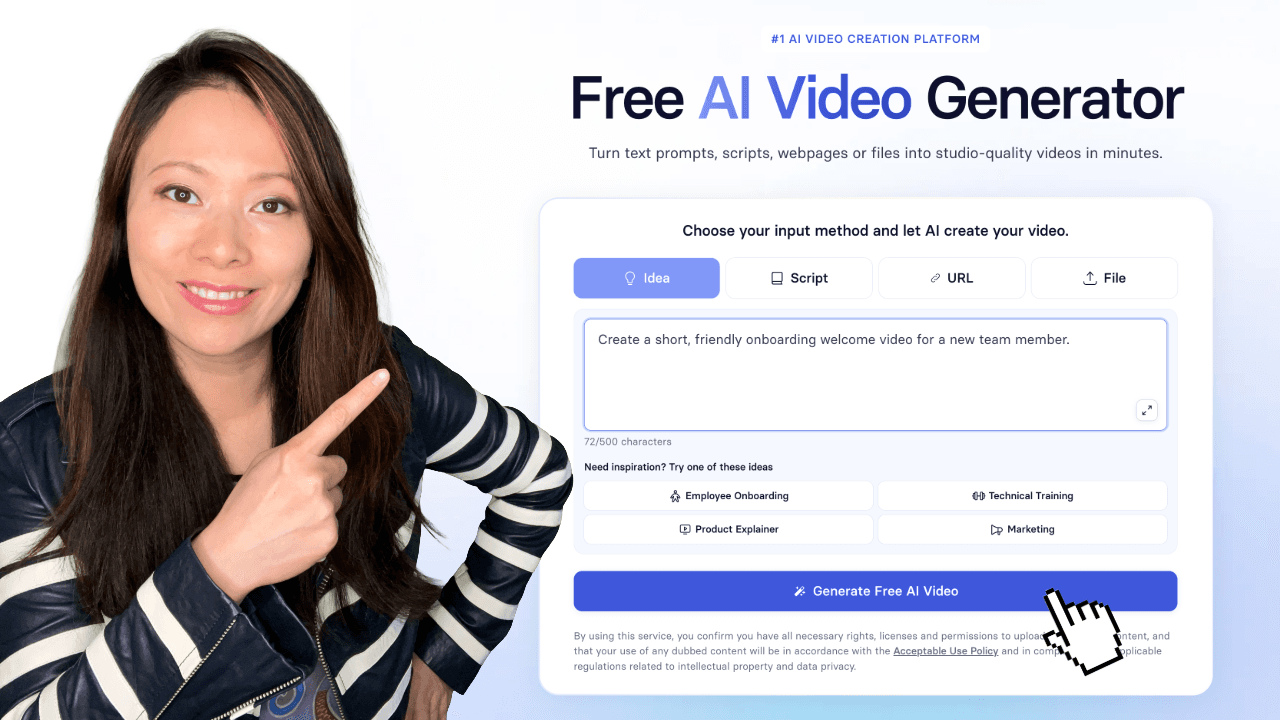
When you go to the free tool page, Synthesia gives you four options to begin:
- Idea: This is the easiest starting point. You just type a simple prompt, like “Create a short welcome video for new employees.” The AI will adapt and either generate a short cinematic video clip, or write a script and build a complete video draft for you.
- Script: If you already know what you want to say, you can paste your own text directly.
- URL: You can paste a link to a webpage or article, and the AI will summarize it and turn it into a video.
- File: You can upload a document (like a PDF or PowerPoint), and it will transform it into a video presentation.
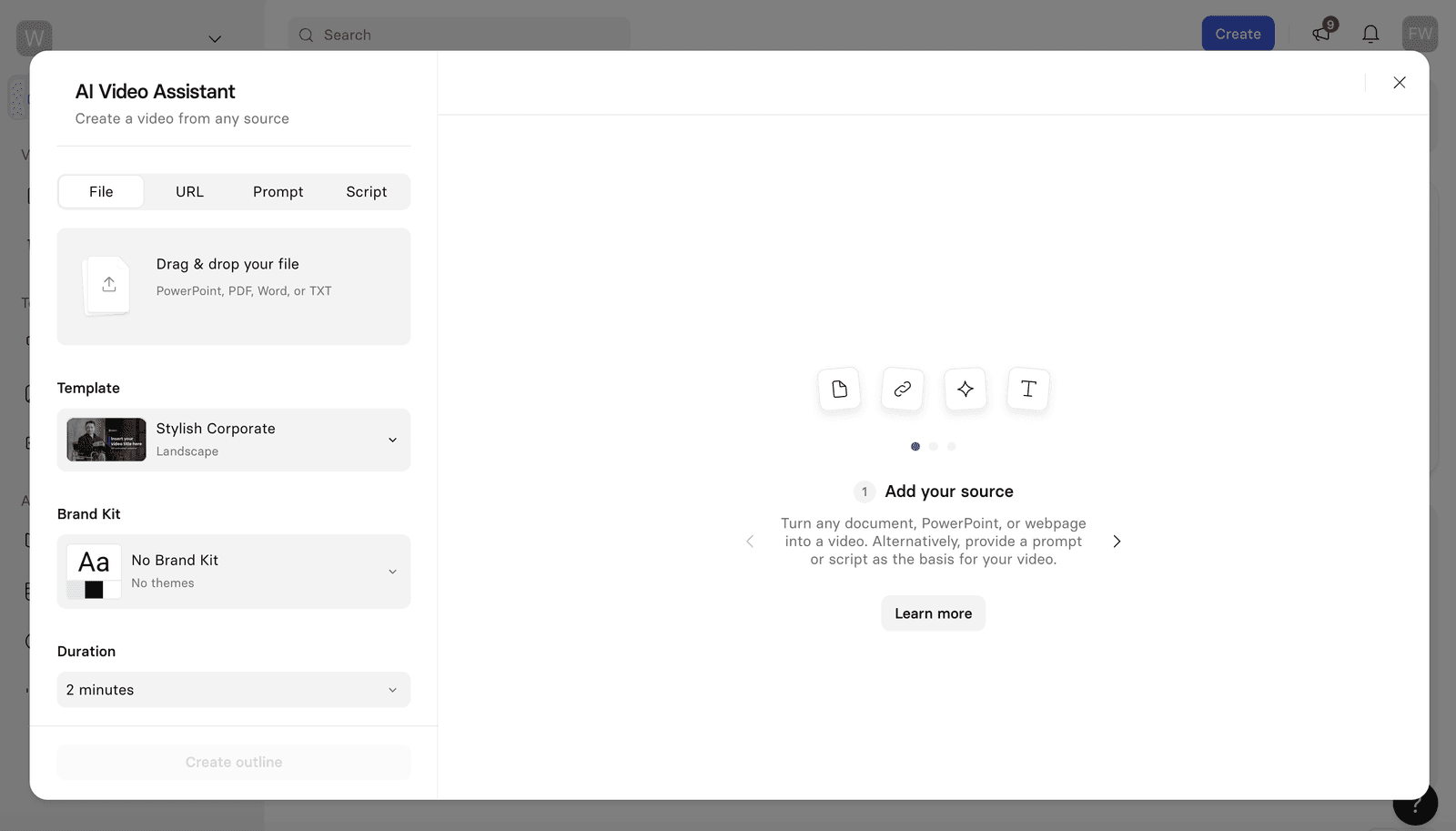
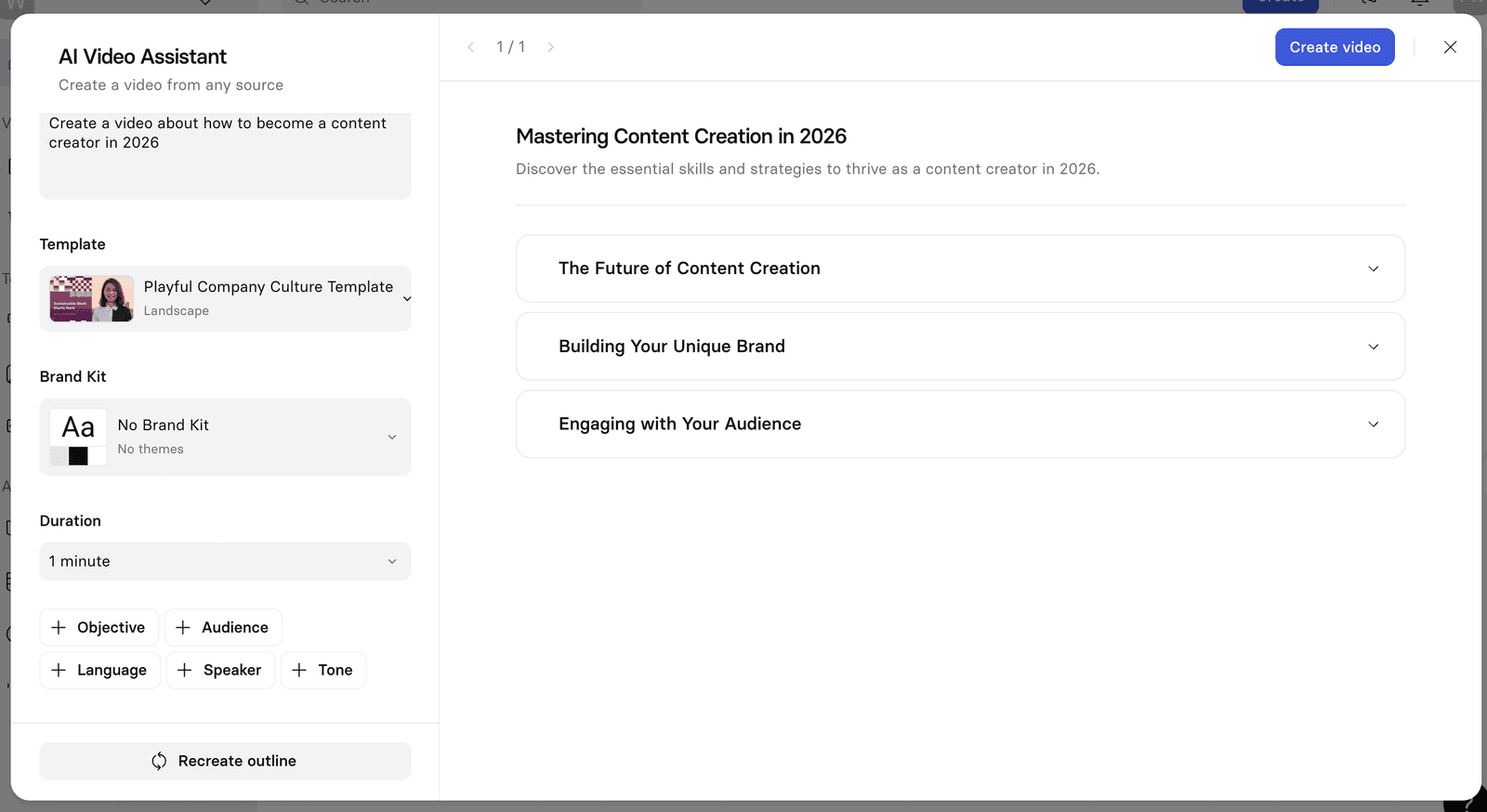
For my test, I chose the “Idea” option and typed: “Create a short, friendly onboarding welcome video for a new team member.” I was then taken into the AI Video Assistant.
Customize Your Video
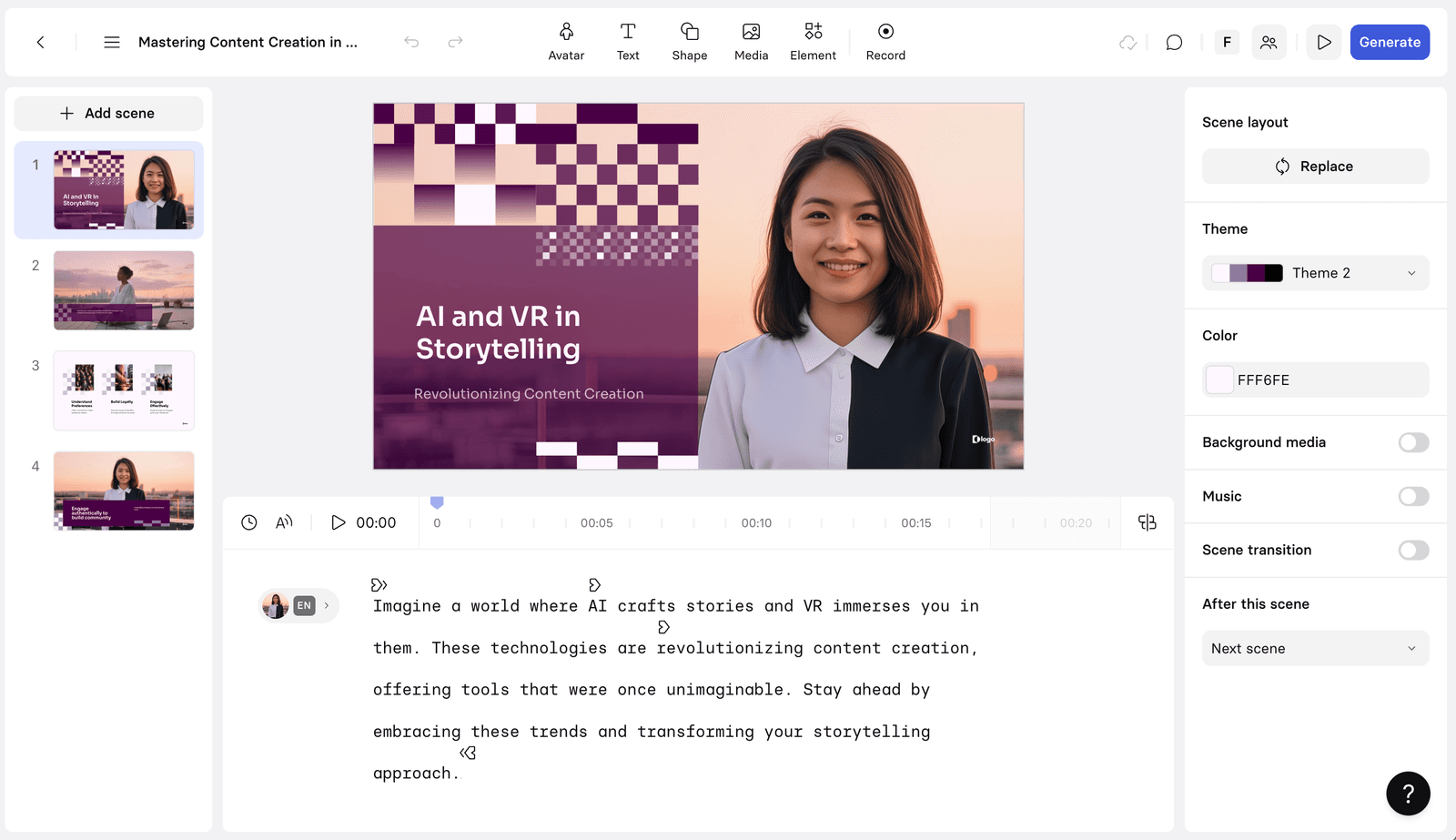
Once the AI generates a draft, you can start making it your own. The free editor lets you change the most important things:
Edit the Script: You can change any word just by typing.
Choose an Avatar: Select from a library of realistic AI presenters.
Add Visuals: You can add text on screen, shapes, and other simple graphics.
Switch Templates: Choose a background and layout that fits your style.
This part feels as easy as editing a PowerPoint slide. It’s all drag-and-drop and very intuitive. If you’ve ever created a presentation or used basic design software, you’ll feel right at home with this AI video creation tool.
Generate Your AI Video
When you’re happy with your edits, you just click the “Generate” button.
In about 10-20 minutes (depending on the length of your video), it is ready. Synthesia will send you a link to watch and share it. You can embed it on a website, share it in an email, or post it on social media directly from the link.
That’s it! In three simple steps, you’ve gone from a single sentence to a finished video. No rendering hours, no file exports to manage, no complicated video editing timeline to navigate.
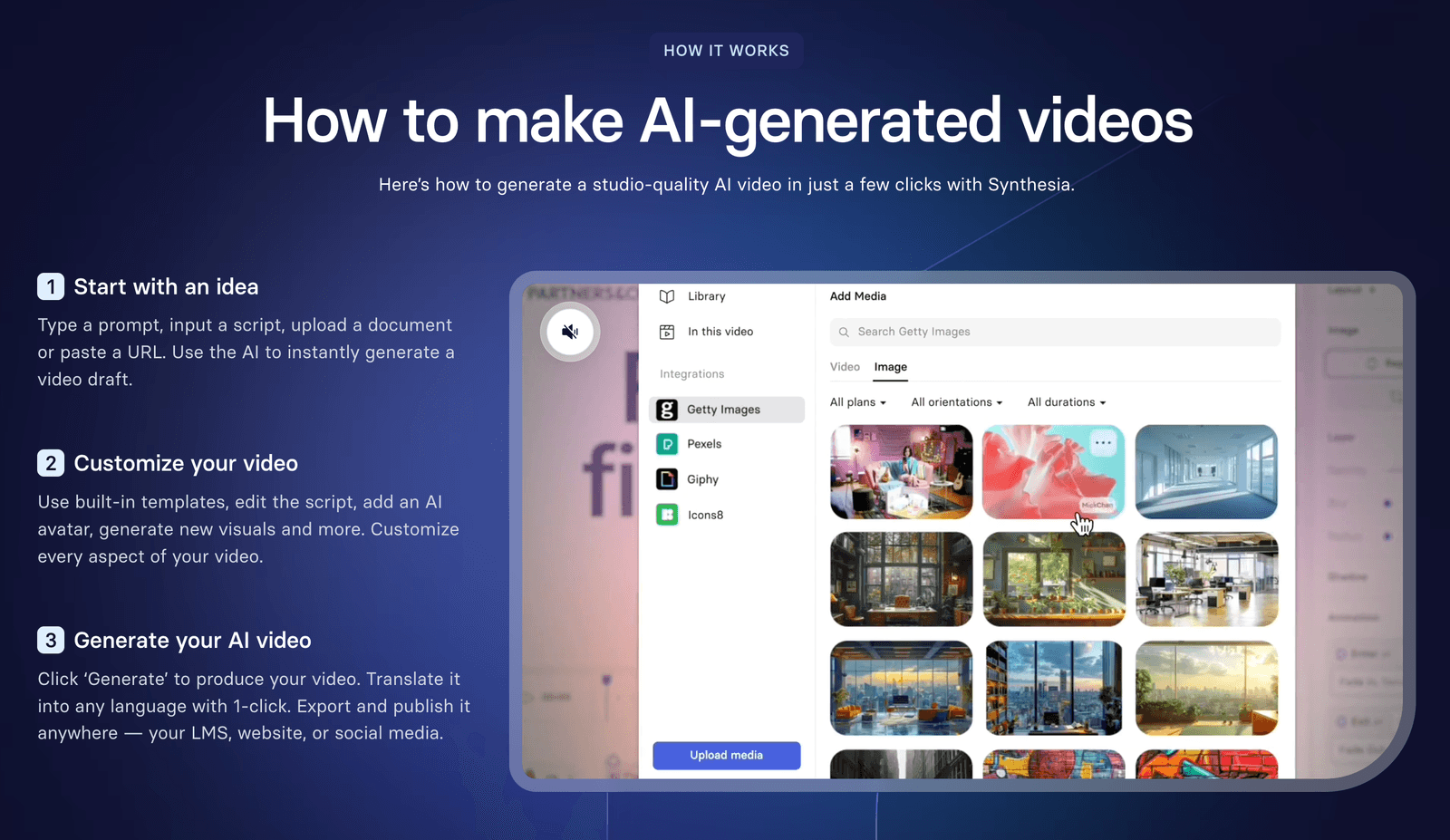
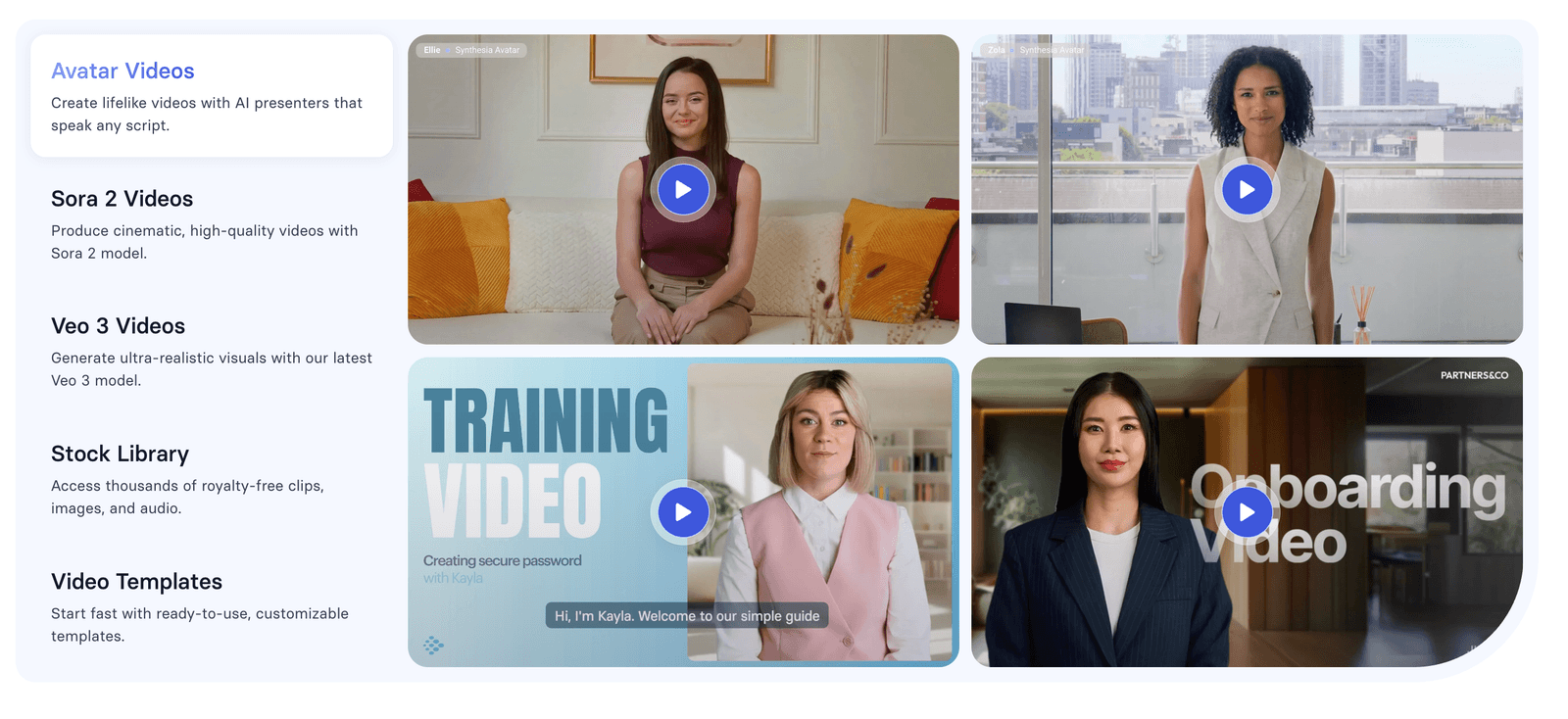
Alternatively, depending on your text prompt when using the AI Video Generator tool, you’ll land in Synthesia’s new AI Playground. Here you’re able to generate short video clips using the latest AI models like Sora 2 and Veo 3, entirely for free.
What Can You Create with the Free Tool? (Real Examples)
This free tool is perfect for creating short, professional videos quickly. Here are a few ideas:
- Training Videos: Create a quick “how-to” guide for a new software. Instead of scheduling a screen recording session, just write out the steps and let the AI avatar walk your team through the process.
- Marketing Content: Make a short video announcing a new product feature for social media. Turn your product update email into an engaging video post that gets more attention in feeds.
- Sales Pitches: Turn a sales email into a personal video message. Video messages have higher open rates and engagement than plain text emails.
- Onboarding: Welcome new team members with a friendly video from an “HR avatar.” It’s more personal than a text document and more scalable than recording individual welcome videos.
- Product Explainers: Break down a complex idea into a simple, easy-to-watch video. Use it to create customer support content or educational materials for your audience.
- Internal Announcements: Share company updates or policy changes in a more engaging format than another email in the inbox.
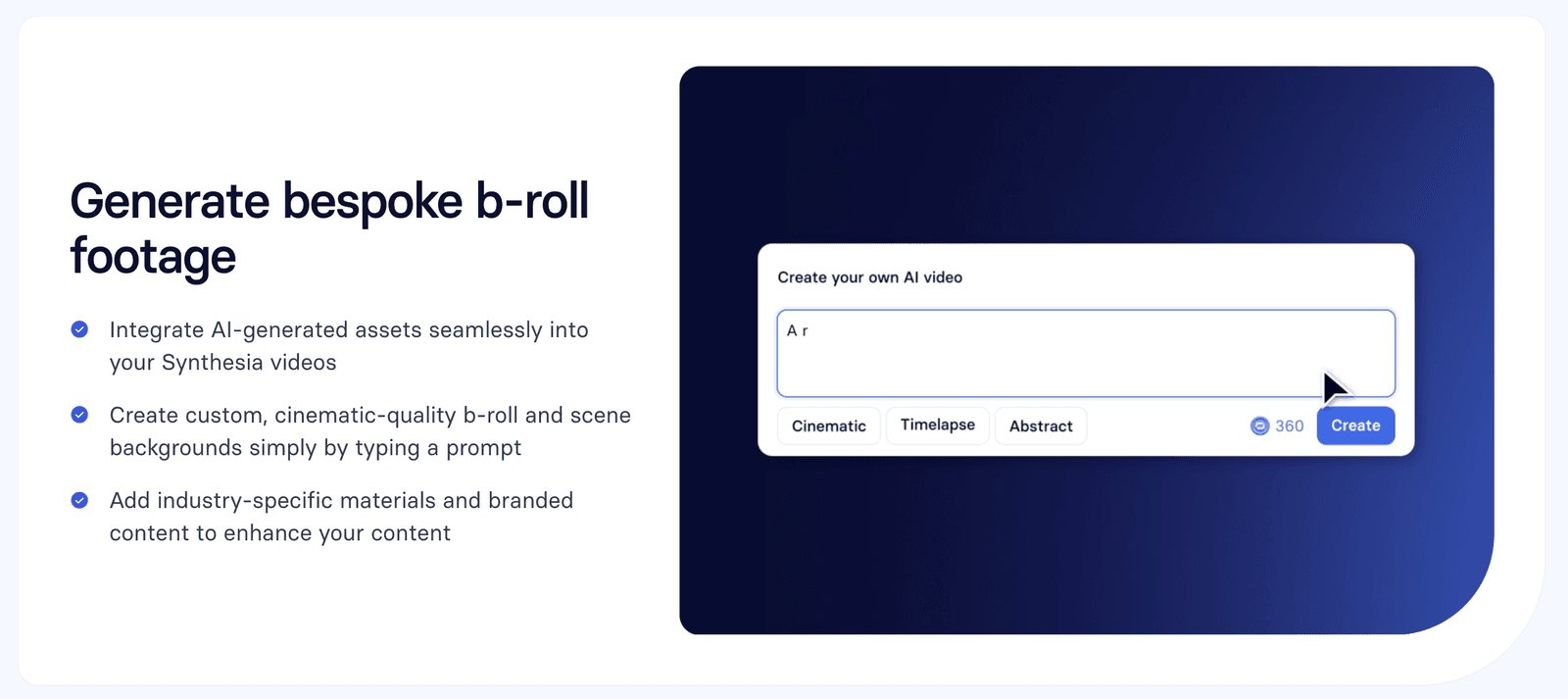
- Cinematic b-roll: In Synthesia’s AI Playground, generate short video clips for any use case.
It’s a powerful way to see if AI video technology is a good fit for your business without any commitment.
Key Features You Can Test for Free
Even though it’s a free tool, Synthesia gives you a real taste of its powerful technology. Here’s what you get to try:
1. Lifelike AI Avatars
You can choose from over 240 diverse, realistic AI avatars. These aren’t cartoons; they look like real people and have natural gestures that make the video feel professional.
The avatars blink, move their heads naturally, and have facial expressions that match the tone of your script. This attention to detail makes a huge difference in how your audience receives the message.
2. AI Voices in 140+ Languages
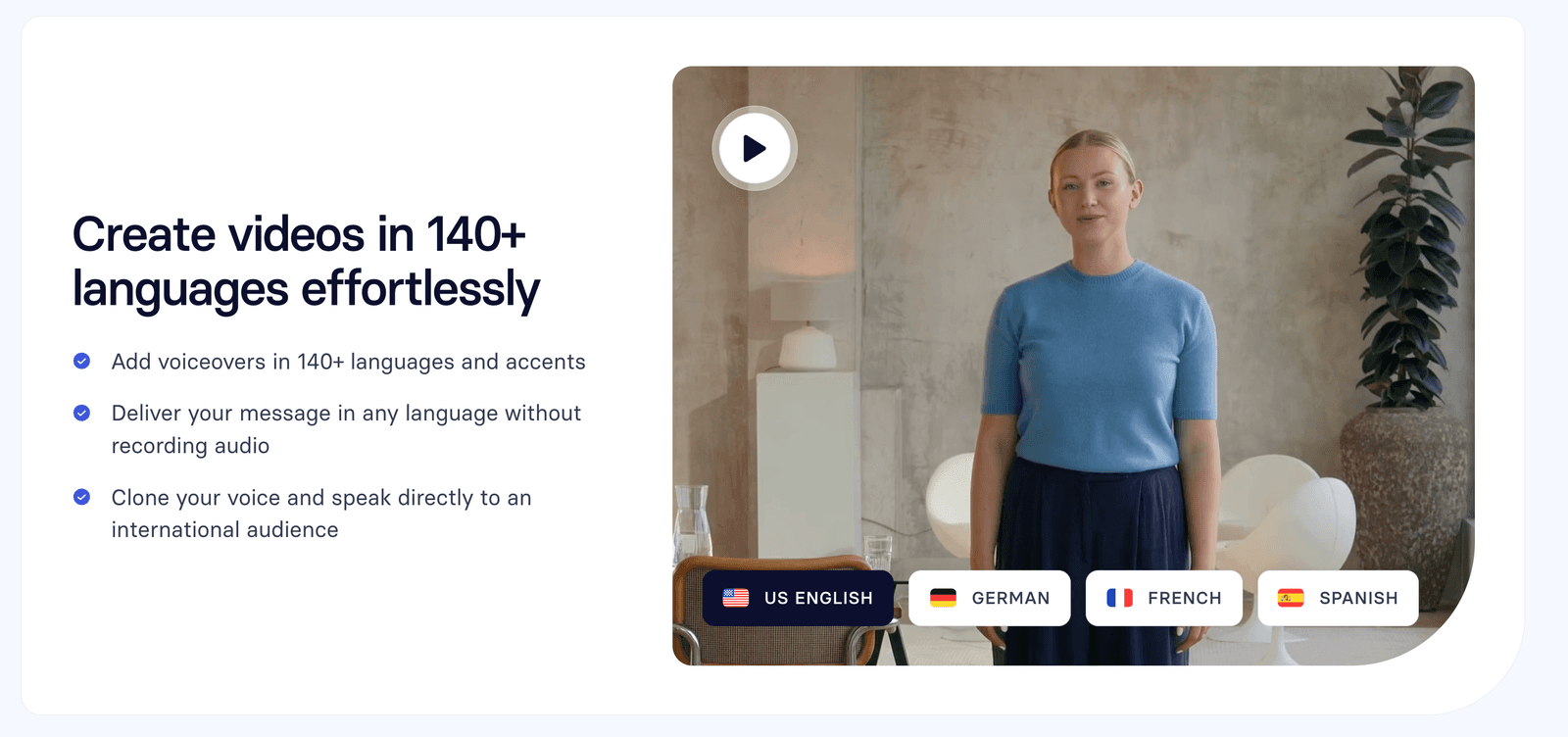
This is one of my favorite features. You can generate a voiceover in almost any language. This is amazing for companies that work with international teams or customers.
Whether you need a video in Spanish for your Latin American market, Mandarin for your Asian partners, or French for your European clients, the AI voice generator handles it seamlessly. The voices sound natural and professional—not robotic like older text-to-speech technology.
3. High-Quality Video Models (Sora 2 & Veo 3)
Behind the scenes, Synthesia uses advanced AI video models like Sora 2 and Veo 3. This technology helps create cinematic, high-quality background footage (B-roll) that makes your video look more dynamic and engaging.
These aren’t just static backgrounds. The AI can generate relevant visuals that complement your message, making your videos look professionally produced even when you’re creating them in minutes.
The Big Question: Is It Really Free?
Yes, it is 100% free to create a video with the generator. You don’t need to enter a credit card or sign up for a trial.
Of course, there are some limitations to the free version:
- You can’t download the video file. You get a shareable link instead.
- Videos may have Synthesia branding.
- Customization is limited compared to the full paid plans.
Think of it as the perfect test drive. It lets you experience the core magic of AI video creation and decide if you want to unlock more powerful features, like creating your own custom avatar or getting unlimited videos.
For many use cases, like sharing a quick team update, creating a social media post, or testing whether video works for your audience, the free version is more than enough to get started.
How Synthesia Compares to Other AI Video Tools
I’ve tested several AI video generators, and Synthesia stands out for its ease of use and professional output quality. While tools like Pictory and Descript focus more on editing existing footage, Synthesia excels at creating videos from scratch with AI avatars.
The avatar quality is noticeably better than competitors, and the multi-language support is unmatched. If you need to create videos with a human presenter but don’t want to be on camera yourself, this is the best option I’ve found.
Tips for Getting the Best Results
After creating several test videos, here are my recommendations for making the most of the free tool:
- Keep your script conversational. Write like you’re talking to a friend, not reading from a corporate manual. The AI avatars deliver the most natural performance with conversational scripts.
- Break up long paragraphs. Short sentences and frequent pauses make the video easier to follow. Aim for 2-3 sentences per paragraph in your script.
- Test different avatars. Different avatars have different energy levels and presentation styles. Try a few to see which one matches your brand voice best.
- Use the URL feature strategically. If you have a blog post or article that’s performing well, turn it into a video to reach people who prefer video content. It’s an easy way to repurpose your best content.
- Add your branding. Even in the free version, you can add text overlays with your company name or key messages to make the video feel more branded.
Real-World Use Case: How I Used It
Let me share a concrete example. Last week, I needed to create a quick explainer video about our podcast production services for a potential client. Instead of scheduling a recording session, writing a full script, filming, and editing (which would have taken me at least half a day), I:
- Spent 10 minutes writing key points about our process
- Pasted them into Synthesia’s free tool
- Chose an avatar that matched our brand’s professional but friendly tone
- Generated the video in under 2 minutes
The client loved it. They said it was exactly what they needed to understand our services, and it felt personal even though I wasn’t on camera. That’s the power of this technology, it lets you scale personal communication in ways that weren’t possible before.
Who Should Use This Tool?
Based on my experience, here’s who will get the most value from Synthesia’s free AI video generator:
- Marketing Teams: Create social media content, product announcements, and promotional videos without waiting for production resources.
- Sales Professionals: Send personalized video messages to prospects that stand out in crowded inboxes.
- HR and Training Departments: Build scalable onboarding videos, training modules, and company announcements that you can update easily.
- Content Creators: Repurpose written content into video format to reach broader audiences across different platforms.
- Small Business Owners: Create professional-looking videos without hiring a production team or learning complex video editing software.
- Educators and Course Creators: Turn lesson plans and educational content into engaging video lectures.
If you find yourself thinking “I wish I had a video for this” more than once a week, this tool is for you.
Final Verdict: Is It Worth Your Time?
Absolutely. Synthesia’s Free AI Video Generator is one of the fastest and most impressive tools I’ve tested for turning text into video. It solves a real problem for anyone who needs to create professional videos without a big budget or a lot of time.
The technology has reached a point where the avatars look realistic enough for professional use, the voices sound natural, and the entire process is simple enough that anyone can do it. You don’t need to be tech-savvy or have any video production experience.
If you are a marketer, a trainer, a business owner, or just someone curious about the future of video, you should try it. It takes only a few minutes, and it might just change the way you think about creating content forever.
The barriers to video creation have officially collapsed. What used to require thousands of dollars in equipment and hours of production time now takes a few minutes and costs nothing to try.
Frequently Asked Questions (FAQ)
Is Synthesia’s AI video generator completely free?
Yes, you can use the tool on their website to generate a video for free. You get a shareable link to your finished video without needing a credit card.
What formats can I start with?
You can start with a simple text prompt (an idea), a full script, a URL to a webpage, or by uploading a file like a PDF or PPT. This flexibility means you can work with whatever content you already have.
Can I use my own voice?
The free tool uses high-quality stock AI voices. Voice cloning (using your own voice) is a feature available in the paid Synthesia plans. The stock voices are professional and natural-sounding, covering over 140 languages.
Can I download my video?
With the free generator, you get a link to share and embed your video. Downloading the MP4 file is available on the paid plans. The shareable link works for most use cases, including embedding on websites and sharing via email or social media.
Is it safe for businesses to use?
Yes. Synthesia is built for professional use and is trusted by major companies. They have strong security policies (SOC 2 and GDPR compliant) to protect your data. Your content and videos remain private and secure.
How long does it take to generate a video?
Most avatar-led videos are ready in about 10-20 minutes after you click generate. The actual time depends on the length of your script and the complexity of your customizations.
Can I edit my video after it’s generated?
With the free tool, you make all your edits before generating the final video. Once generated, you’d need to create a new version with your changes. The paid plans offer more flexibility for editing and iterating.
What video length can I create?
The free tool is designed for short videos, typically up to a few minutes long. This is perfect for social media posts, quick announcements, and brief explainers. Longer video projects are better suited for the paid plans.
Do I need any technical skills?
Not at all. If you can type and click a mouse, you can create a video with Synthesia. The interface is designed to be as simple as possible—no video editing knowledge required.
Can I use these videos commercially?
Yes, videos created with Synthesia can be used for commercial purposes. Check their terms of service for specific details, but the tool is designed for business use including marketing, sales, and training.

Written by
Fei WuFei Wu is the founder and CEO of Feisworld Media, a Massachusetts-based digital media company helping brands get discovered by people and by AI. An Adobe Global Ambassador and brand partner to ElevenLabs, Synthesia, and 50+ other tech and AI companies, she hosts the Feisworld Podcast (400+ episodes, 500K+ downloads — guests have included Seth Godin, Steve Wozniak, Chris Voss, and Arianna Huffington) and co-created the documentary Feisworld: Live Your Art on Amazon Prime. Fei writes for CNET, Lifehacker, and PCMag, and her work has been featured in Forbes, Harvard Business Review, and WIRED. She has been publishing on the internet since 2014 — long before AI discoverability had a name.
View all posts by Fei Wu→Stay updated
Weekly insights on content, AI, and digital media.
Keep Reading


