Adobe just announced something worth watching: Adobe for creativity is now available in Claude.
This means you can work inside Claude and ask it to help create, edit, resize, repurpose, and polish creative assets using Adobe’s tools in the background. Adobe describes this as a connector with access to 50+ tools across Creative Cloud, including Photoshop, Lightroom, Illustrator, Firefly, Premiere, Express, InDesign, and Adobe Stock.
For creators, small business owners, marketers, and educators, this is a big deal. Not because Claude suddenly replaces Adobe apps, but because it gives us a new starting point. Instead of opening several apps and figuring out the workflow from scratch, we can begin with a simple prompt:
“Create a social post for my event.”
“Resize this video for Reels.”
“Retouch these headshots.”
“Make this campaign look more polished.”
That is where this gets interesting.
What Adobe in Claude Can Do
Adobe says the new connector can support multi-step workflows across Creative Cloud apps. In plain English, Claude can help choose the right Adobe tools for the job instead of making you figure out every step manually.
A few examples Adobe highlights:
| What you want to do | How Claude + Adobe can help |
|---|---|
| Retouch portraits | Improve lighting, blur the background, straighten the image, and crop for portrait use |
| Design social assets | Start from Adobe Express design examples, update text and colors, and animate |
| Resize videos | Reformat horizontal clips for YouTube Shorts, Instagram Reels, TikTok, and more |
| Batch edit photos | Apply consistent edits to a group of images |
| Continue in Adobe apps | Start in Claude, then keep refining in Express, Firefly Boards, or other Adobe apps |
The important distinction is that this is not just Claude giving design advice. It is Claude connecting to Adobe tools so you can move closer to a finished creative asset from inside the conversation.


How to Get Started with Adobe inside Claude
In order to get started with Adobe inside Claude, you need to first enable the “Adobe for creativity” connector in Claude. Here are the steps:
- Open Claude at claude.ai (or Claude Desktop) and sign in.
- In the left sidebar, click Customize.
- Select the Connectors tab, then click the + button.
- Click Browse connectors.
- Search for Adobe for creativity and click it.
- Click Install and confirm the connection.
- Sign in with your Adobe account to unlock higher usage limits, more tools, and work that saves across sessions. (You can skip this step and continue as a guest, but with reduced capabilities)
You can visit Adobe’s Get Started guide here for more details on Adobe x Claude.
The Adobe Express Angle
For my audience, Adobe Express in Claude is probably the most approachable part of this announcement.
Adobe Express has always been useful for people who need to create quickly without becoming professional designers. Think social posts, flyers, event graphics, thumbnails, announcements, and quick marketing assets.
Inside Claude, the Express-specific workflow appears especially useful for:
| Adobe Express feature in Claude | Why it matters |
|---|---|
| Design from templates | Describe your campaign and choose from Express design examples surfaced in the chat |
| Text edits | Replace placeholder copy with your event title, date, offer, or call to action |
| Color edits | Adjust colors to better match your brand or campaign |
| Animation | Turn a static design into something more social-friendly |
| Continue in Express | Start in Claude, then open the asset in Express for full editing control |
Adobe’s own example is simple: describe your campaign, choose from Express design examples, update the text and colors, and animate the result.
That workflow is perfect for creators and small businesses because it meets us where a lot of real creative work begins: not with a perfect design brief, but with a rough idea and a deadline.
For example, I can imagine using this for Xiang Li Art:
“Create an Instagram story for our Chinese empress art opening. Make it elegant, warm, and museum-inspired. Include the date, location, and a short call to action.”
With this general prompt inside Claude, a simple and generic template was created. Keep in mind that very little information was provided with no color palette specified.

Next, I decided to ask Claude to “give me more Adobe Express templates to choose from for this design”. Claude automatically selected 12 templates for me to choose from, with the option to “personalize” when I click on one of the templates.

The personalization took seconds, and all the event details were populated in the template.
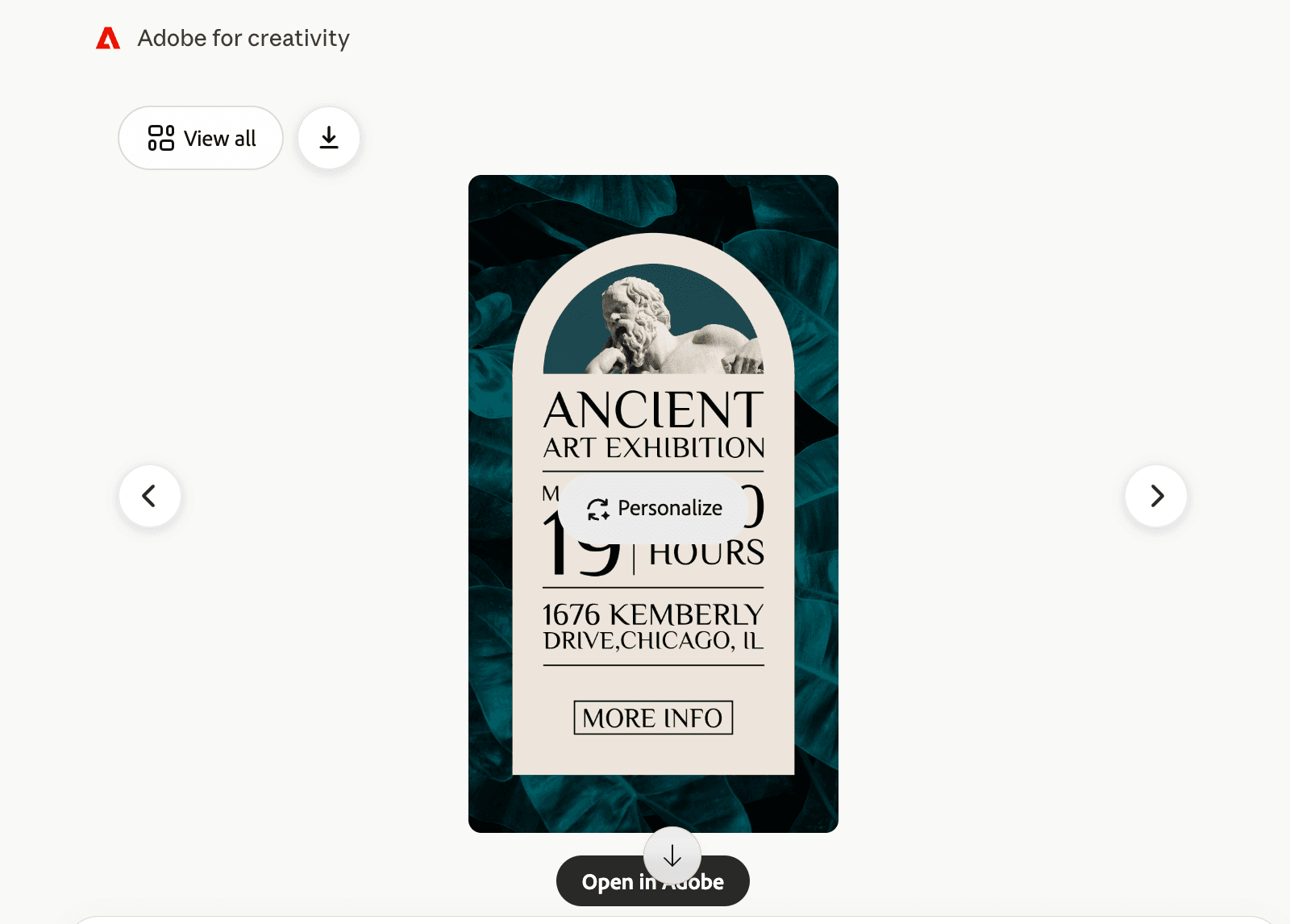
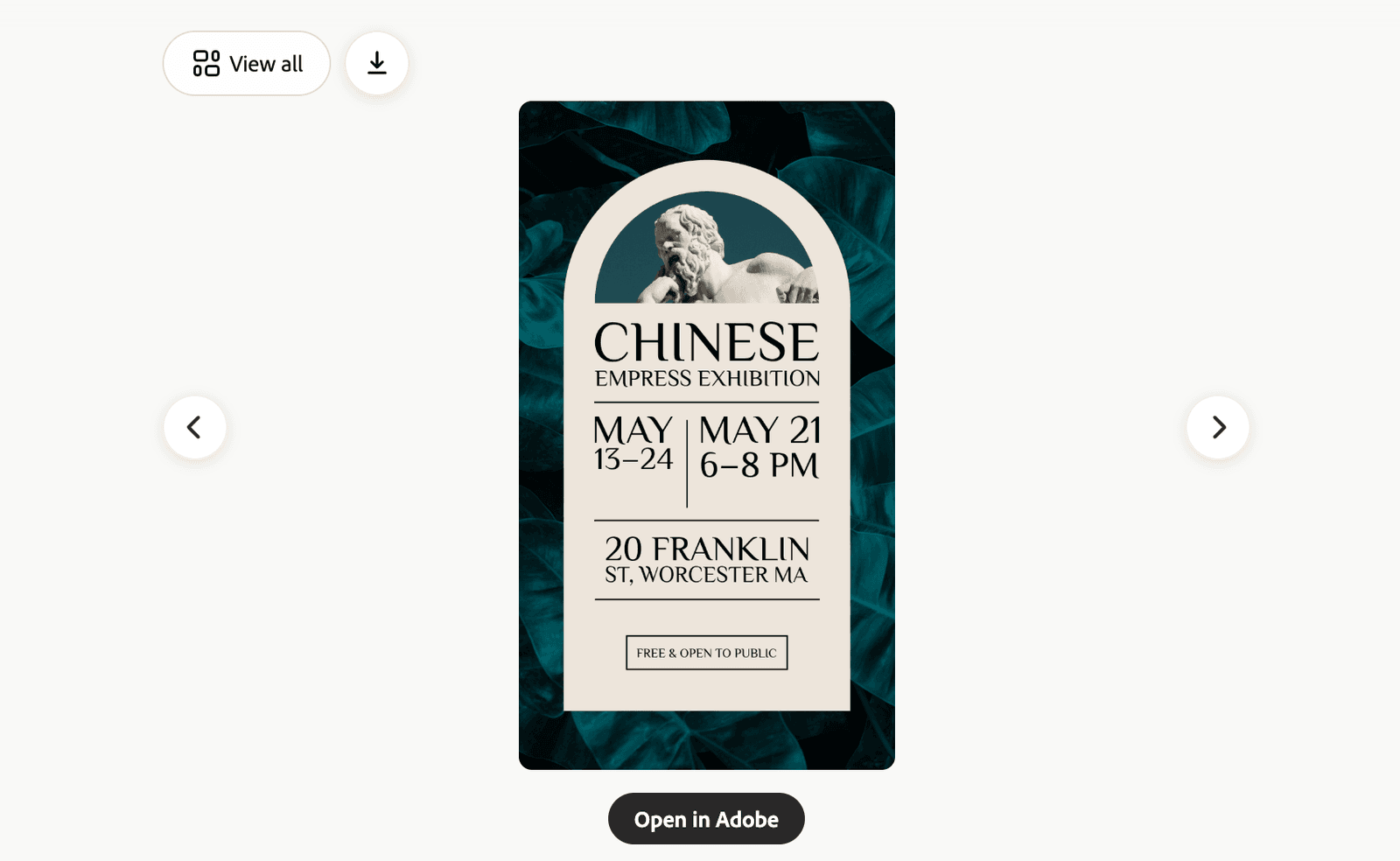
To make further changes such as the featured image, font sizes, background color, etc., I’m able to open up the design in Adobe Express AI Assistant for further edits and enhancements.

Because I’m experimenting the Adobe Express feature inside Claude on day one of its release, I noticed sometimes the details presented in Claude (i.e. event details) aren’t always carried over to Adobe Express on the first try, as seen in the example above.
That said, Claude helps you get started, and Adobe Express gives you the final editing control. That combination feels practical.
This Is Not the Full Firefly AI Assistant
One thing to understand is that Adobe in Claude is powerful, but it is not the full Adobe Firefly AI Assistant experience.
Adobe says Firefly AI Assistant offers the deeper Adobe-native creative agent experience, including more generative AI capabilities such as Generative Fill and Replace Background, plus more visibility into how assets evolve step by step.
So I would think of it this way: Claude is a great place to start the creative request, while Adobe apps are still where you go deeper.
That is not a weakness. It is actually a natural workflow. You can start with the idea in Claude, generate or adapt the asset, then continue in Express, Firefly, Photoshop, Premiere, or whichever Adobe app gives you the control you need.
How This Is Different from Adobe in ChatGPT
Adobe is also bringing Adobe apps into ChatGPT, but the positioning is different.
The simplest way to compare them:
| Adobe in Claude | Adobe in ChatGPT |
|---|---|
| Broader Creative Cloud connector | More focused Adobe app experience |
| Includes Photoshop, Lightroom, Illustrator, Firefly, Premiere, Express, InDesign, and Stock | Focuses more clearly on Photoshop, Adobe Express, and Acrobat |
| Strong for cross-app creative workflows | Strong for practical tasks like image edits, Express designs, and PDF workflows |
| Useful for creators managing photo, video, design, and asset workflows | Useful for everyday users who want quick design, image, or document help |
| Best when you want Claude to help orchestrate a creative process | Best when you want a focused Adobe app inside ChatGPT |
For my workflow, I see them as complementary. Claude + Adobe feels like a broader creative command center, while ChatGPT + Adobe feels more direct for specific tasks, especially when working with an image, a quick Express asset, or a PDF.
I’ll cover the ChatGPT side separately, because Acrobat in ChatGPT deserves its own discussion.
Day 1 Testing Is Only the Beginning
One thing I’ve learned from covering AI and creative tools over the past few years is that Day 1 is rarely the best day to judge a new integration.
It is usually the loudest day. Everyone is testing at once, people are sharing screenshots, early demos look exciting, and expectations rise very quickly. But it can also be the day when people feel the most disappointed or overwhelmed, because the product is new, the documentation is still evolving, and real-world workflows are not always as polished as the announcement makes them sound.
That does not mean the tool is bad. It means the first day is only the beginning.
For creators and small business owners, my suggestion is simple: try it now if you are curious, but don’t make your final judgment today. Set a reminder to test it again in two to four weeks, especially with a real project you care about. By then, more examples will be available, the integration may improve, and we’ll have a better sense of what works well in everyday creative workflows.
This is especially important with Adobe and AI because these tools are changing fast. A feature that feels limited today may become much more useful after a few updates. At the same time, a feature that looks magical in a launch demo may still need a human creator to guide, refine, and finish the work.
So instead of asking, “Is this perfect on Day 1?” I would ask:
“Where does this save me time today, and where do I still need my own creative judgment?”
That is a much better way to evaluate tools like this.
Designers Are Not Being Replaced
Whenever a new AI creative tool is announced, the same question comes up: Does this replace designers?
I don’t think so.
What these tools can do is help more people get started. They can generate options, resize assets, suggest layouts, change colors, remove backgrounds, create variations, and turn a rough idea into something visual much faster than before. That is valuable, especially for solo creators, small teams, educators, nonprofits, and business owners who do not always have design support.
But there is a big difference between generating a design and knowing why a design works.
A designer understands things most people do not notice at first glance: composition, hierarchy, spacing, typography, contrast, color harmony, visual weight, negative space, image quality, accessibility, brand consistency, and how a design should feel in context. In Photoshop, Illustrator, Express, Premiere, or InDesign, even a “simple” change often involves a chain of decisions.
For example, making a photo “stand out” is not just one button. It may involve adjusting exposure, highlights, shadows, contrast, vibrance, saturation, white balance, background blur, masking, crop, subject selection, skin tone, texture, sharpness, and the relationship between the subject and the background.
Making a graphic feel more premium might involve changing the typeface, font weight, line height, letter spacing, margins, grid structure, color palette, image treatment, and visual rhythm. A non-designer may know that something looks “off,” but not always know whether the issue is contrast, alignment, scale, color temperature, or hierarchy.
That is where native app knowledge still matters! And where our experience give us a head start.
AI can help you move faster, but experienced designers know how to ask better questions, diagnose visual problems, and make subtle changes that improve the final result. They also know when not to over-edit, when to protect brand consistency, and when a design needs restraint instead of more effects.
So no, I don’t see Adobe in Claude as replacing designers. I see it as raising the floor for everyone else while making design judgment even more important.
The more AI tools we have, the more valuable it becomes to know what good looks like.
Feisworld Take
This launch matters because creative work often begins before we open a design app. It starts with a messy idea, a campaign, a video, a social post, a client deliverable, a community event, or a half-formed visual direction.
Adobe in Claude gives creators a new way to move from idea to execution without getting stuck at the blank canvas stage.
For Adobe Express users specifically, this could become a very practical workflow: use Claude to describe the asset, pull from Adobe Express templates, adjust text and colors, animate, then continue in Adobe Express for final polish.
That is the sweet spot: not replacing the creator, not replacing the designer, and not replacing Adobe apps, but helping us get started faster with fewer tabs open.
It’s important to acknowledge that I am not an experienced user in Photoshop, Illustrator and many other Creative Cloud applications. Two primary functions I use in my everyday practice are Adobe Express and Adobe Firefly. Therefore I am interested in learning what other creators experience with Claude and 50+ tools across Creative Cloud apps. If you are one of them, please leave me a comment below.
I’m also very interested in seeing how Adobe’s integrations evolve in Claude, ChatGPT and LLMs over time. Be sure to check back on our blog for ongoing discussions and discoveries!
You might also enjoy…

Written by
Fei WuFei Wu is the founder and CEO of Feisworld Media, a Massachusetts-based digital media company helping brands get discovered by people and by AI. An Adobe Global Ambassador and brand partner to ElevenLabs, Synthesia, and 50+ other tech and AI companies, she hosts the Feisworld Podcast (400+ episodes, 500K+ downloads — guests have included Seth Godin, Steve Wozniak, Chris Voss, and Arianna Huffington) and co-created the documentary Feisworld: Live Your Art on Amazon Prime. Fei writes for CNET, Lifehacker, and PCMag, and her work has been featured in Forbes, Harvard Business Review, and WIRED. She has been publishing on the internet since 2014 — long before AI discoverability had a name.
View all posts by Fei Wu→Stay updated
Weekly insights on content, AI, and digital media.
Keep Reading


