We kept WordPress for writing. We stopped asking it to make every public decision.
The first wobble I remember was boring: I was in Ops, looking at a post Fei had just touched in WordPress. The featured image was there in WordPress. Ops still warned me it was missing.
I refreshed once, because of course I blamed the dashboard first. Same warning. The system was doing what we had designed: a WordPress change did not become public truth until the review layer caught up. But as the person responsible for that review layer, I felt the wrong kind of doubt. If Ops could not see the image Fei had just added, what else might it be stale about?
That is where the migration stopped being theoretical for me.
Speed mattered. Modern tooling mattered. A cleaner frontend mattered. The real test was whether we could trust the path from edit to public page. Fei still needed a familiar place to write. I needed a way to review old content without guessing what was live. The public site needed to render the approved version, not whatever happened to be the latest edit inside the CMS.
So we kept WordPress and changed its job.
WordPress became the authoring place. The public site moved to Next.js. Turso became the approved content layer. Feisworld Ops became the review system. Vercel became the deployment and hosting layer.
This is the second article in the Feisworld migration series. In the first one, Why We Rebuilt Feisworld for AI Brand Visibility, I explained why the migration became more than a redesign. This article is about the architecture choice underneath it: why we kept WordPress, why we stopped letting WordPress run the public site, and what we learned from building a human-reviewed publishing system around it.
The CMS Was Doing Too Many Jobs
WordPress was never the enemy in this project.
I want to say that early because a lot of headless WordPress articles make the story too clean. WordPress is old. JavaScript is new. Move to the new thing. Done.
Our version was less tidy. WordPress helped Feisworld publish for years. Fei knew the editor. The archive lived there. The media library lived there. Drafts, revisions, categories, tags, and older publishing habits all lived there too. For a content-heavy company, that kind of muscle memory matters.
WordPress had not failed us. It had become the place where too many decisions were hiding.
Performance was partly a WordPress concern, partly a hosting concern, partly a plugin concern, and partly an image concern. SEO lived across Rank Math settings, theme output, old fields, plugin defaults, and page-level decisions. Redirects lived in plugin state. Affiliate links lived in another plugin. Image behavior had years of WordPress uploads, Optimole wrappers, caching choices, and CDN assumptions around it.
None of those tools were bad in isolation. Most of them helped us at the time. That is how long-running sites get complicated. You solve the problem in front of you, then a few years later that solution becomes part of the next problem.
For Feisworld, the public site needed to become more controlled, more testable, and easier to reason about. We wanted to know which system owned which decision.
Plugins are useful because they hide complexity. They are risky when they hide decisions you actually need to own.
Headless Was Not the Hard Part
In a headless WordPress setup, WordPress still manages content, but another app renders the public site. For Feisworld, that app is Next.js.
WordPress content can be exposed through the WordPress REST API or through tools like WPGraphQL. Vercel has a useful short guide on this here: Using Headless WordPress with Next.js and Vercel.
The technical definition was the easy part.
The hard part was deciding what happens between a WordPress edit and the public page. A simple headless site can publish from the CMS, trigger a revalidation, and move on. That would have been too loose for us.
We did not want every WordPress save to become public truth. We wanted approved snapshots, metadata checks, old content cleanup, broken link checks, affiliate checks, and a visible human review step. We wanted to separate “this exists in WordPress” from “this is ready for the public site.”
Why We Kept WordPress
The easy answer would have been to leave WordPress completely.
We could have moved to a different CMS. We could have turned the archive into Markdown. We could have built an entirely custom writing interface. All of those options were possible.
We chose a less dramatic path because those options solved the wrong part of the problem first.
Fei did not need a harder place to write. The team did not need to relearn the basics of publishing. The archive did not need another massive content move just for the sake of feeling modern.
WordPress is still good at authoring. It has drafts, revisions, media, categories, tags, editor roles, plugins, and a community that has solved many editorial problems already. More importantly, it was already part of how Feisworld worked.
When Fei wants to write, edit, or update a post, I do not want the tool to become the story. The writing tool should get out of the way.
We kept WordPress as the creative source.
The phrase I kept coming back to was this: WordPress should own authoring, not public truth.
That one sentence clarified a lot of decisions.
WordPress could keep the authored body, the original publish date, the editorial title, the media library, and the draft workflow. But WordPress would no longer be the final authority on rendered HTML, schema, canonicals, sitemaps, redirects, affiliate link behavior, or which version of a post was approved for the live site.
That separation preserved the part of WordPress we still liked, while removing the part that had become too risky for us. Public rendering, final schema, sitemaps, redirects, affiliate link state, image paths, and content approval all needed clearer ownership.
Images are a good example. Optimole had helped us before, but old wrapper URLs were still showing up in places where the new public site needed cleaner image data. That is a small detail until you remember that images appear in pages, metadata, structured data, social cards, and AI-readable context.
Content approval was the point. If a headless site publishes every CMS change without review, it can still publish the wrong thing beautifully.
The Feisworld Publishing System
Here is the version I use when I need to explain it without hiding behind system names.
Fei writes in WordPress. When something changes, Ops sees it and asks for a human decision. I can inspect the body, metadata, image state, links, and readiness before anything becomes public. If AI suggestions help, they appear as suggestions, not orders. Once the post is ready, Ops writes an approved public snapshot to Turso. The Next.js site reads that approved snapshot and renders the page on Vercel.
WordPress is where the writing starts. Ops is where we decide whether the public site should trust it yet.
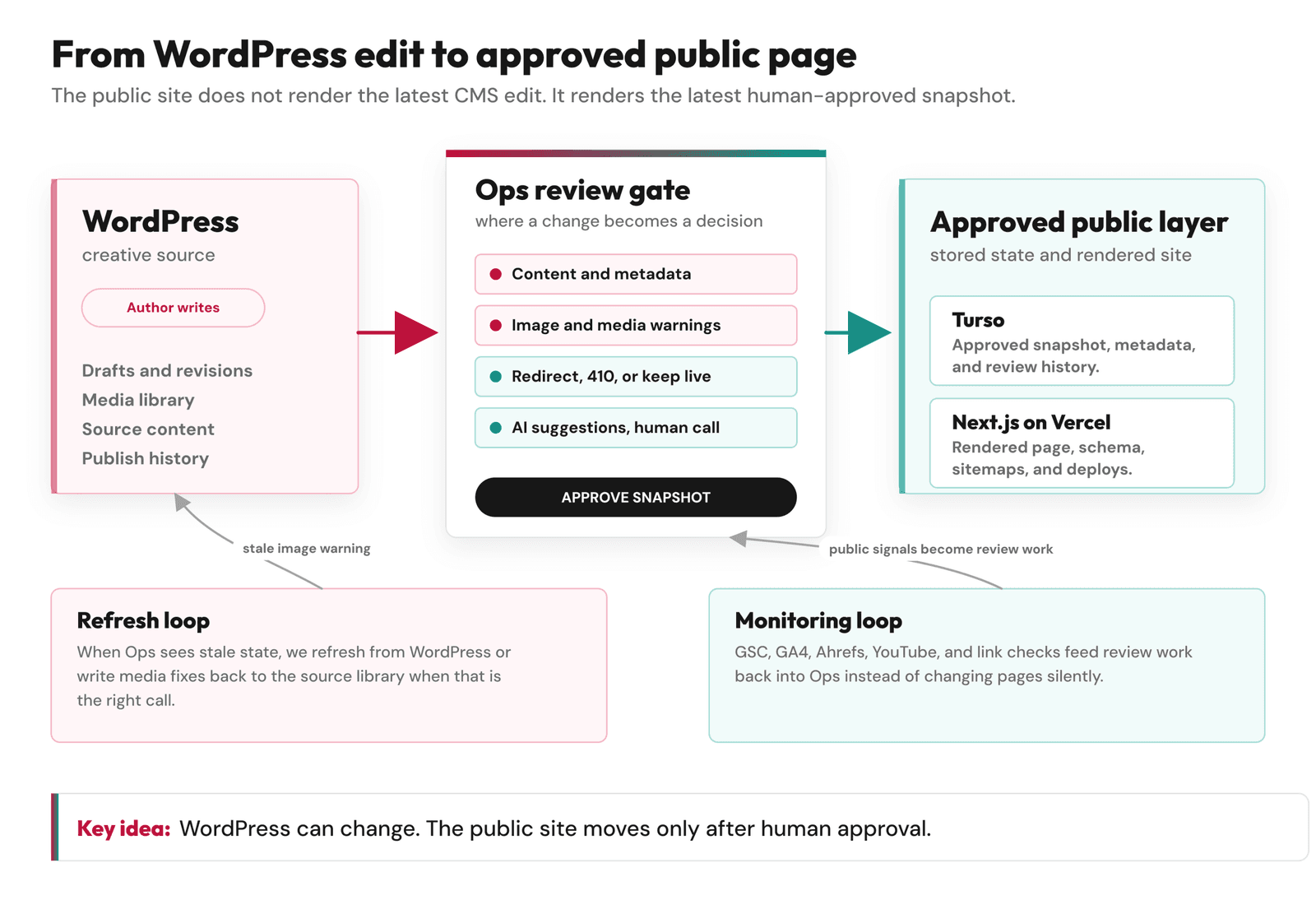
The extra work exists because we wanted a public site that could answer a simple question: what version did we actually approve?
An old post edit might be a typo fix. It might also change the title, remove a video, break an image, or alter the meaning of the post. An unpublish action might deserve a redirect, a 410, or a temporary pause while we decide where readers should go.
We saw the same thing with author paths after launch. Old WordPress-style author URLs still received traffic, but the new site had first-class author pages for Fei and for me. Treating those old paths as random 404s would have been technically easy and editorially lazy. We needed redirects that matched the new entity structure of the site.
AI suggestions created their own version of this problem. A suggested meta description could sound smoother than the old one and still blur the difference between a historical post, a current recommendation, and Feisworld’s present-day position. Better wording was not enough. The suggestion had to be true.
The review layer slows things down in the right place. It gives us a human checkpoint before a public decision is made.
Why We Did Not Pull From WordPress Live Every Time
One of the first architecture questions was whether we should pull content directly from WordPress on every request, or at least treat WordPress as the live source for every public page.
That approach has a lot going for it.
It is conceptually simple. WordPress has the content. Next.js fetches the content. The frontend renders it. Fewer layers. Less sync logic. Less chance of one database having an older version than another.
If our only problem had been “display WordPress posts in Next.js,” I might have preferred that. Display was the easy part. Approval was the hard part.
We needed to answer questions like:
- What version of this post was approved?
- Which metadata was approved with it?
- Did the public page revalidate successfully?
- Did this old image get cleaned up?
- Are there broken links inside the post?
- Are affiliate links still working?
- Did a WordPress edit change something important?
- Was an AI suggestion accepted, edited, or rejected?
- Should this URL stay live, redirect, or disappear?
Those are workflow questions. They do not belong to a raw WordPress API response.
The WordPress REST API and WPGraphQL are useful ways to expose content. But exposing content is not the same as deciding what the public site should trust.
That is why we added Turso between WordPress and the public site. WordPress holds the source material. Turso holds the version we have approved for publication.
Why Turso Became the Approved Content Layer
We chose Turso because we needed a compact operational database that worked well with our Vercel and Next.js setup.
It was not the only good choice. Postgres would have been excellent. A pure Markdown content repo would have been clean. A different CMS could have worked too.
But Turso fit the kind of state we needed to store:
- Approved content snapshots.
- Approved metadata.
- Review state.
- Content hashes and source change tracking.
- Redirect and affiliate decisions.
- Broken link and content monitor results.
- GSC, GA4, Ahrefs, and YouTube-related signals.
- AI suggestion history and human decisions.
The public site does not need to know every messy detail of the workflow. It needs to know what is approved and ready to render.
Turso gives us that middle layer. You can read more about Turso in the official docs here: Turso documentation.
I also liked the portability of the idea. We are not designing Feisworld so every future decision depends on WordPress, Next.js, or one database forever. The important thing is the boundary: source content, approved content, public rendering.
If we ever change the CMS, frontend, or database, the workflow should still be understandable. I do not want to solve one migration by quietly creating the next trap.
What Next.js Owns Now
Next.js owns the public output.
That includes the pages, templates, routes, metadata, schema, sitemaps, redirects, author pages, category pages, blog rendering, and static pages.
For Feisworld, frontend control matters because public claims appear there.
If we generate Article schema, it should match what is visible on the page. If an author page says Fei is the author, the schema should not invent a different author. If a canonical URL exists, it should point to the page we actually want indexed. If a video is embedded, the video data should match a real public video. If a post is not approved, it should not appear in the sitemap.
This is where Next.js helps. It lets us treat the site as software, not just theme settings.
We can write code for the rules. We can test them. We can review changes. We can preview deployments. We can decide which pages are static, which pages revalidate, and which paths should be dynamic. The official Next.js docs explain caching and revalidation here: Next.js caching and revalidation.
I do not want to oversell this. Next.js does not magically make a site clear. It gives you more control, which means you can make clearer decisions if you know what you are doing. It also means you can create confusing behavior if you do not understand caching, revalidation, data ownership, or routing.
That was one of the reasons we kept the public site thin. The main site should render approved content. The complicated review work belongs in Ops.
Where Vercel and v0 Actually Helped
Vercel made this architecture easier to run.
We are v0 ambassadors and have a close relationship with Vercel, so I want that context visible. The tools still had to earn their place in this migration.
Vercel helped with preview deployments, fast iteration, Next.js hosting, route handlers, functions, cron jobs, image optimization, and deployment discipline. It made the infrastructure feel less fragile while the migration itself was very much not simple.
That mattered because we were touching old content, redirects, schema, sitemaps, author pages, partner pages, images, affiliate links, and a lot of hidden behavior. I wanted every change to be reviewable before it went live.
v0 helped in a different way. It was useful for UI exploration, especially dashboard surfaces, responsive layouts, buttons, controls, and sections that needed to work across devices. It did not replace judgment. It shortened the distance between idea and interface.
That is where AI-assisted web development is strong right now. You can ask for a layout, test it, reject it, refine it, and compare versions. The output is visible. You can tell when a button is awkward, when mobile text wraps badly, when a section feels too polished for the brand, or when a dashboard does not support the workflow.
But the tool does not know the migration policy unless you teach it. It does not know which system owns redirects. It does not know whether schema should be generated from WordPress, Turso, or Next.js. It does not know Feisworld’s voice unless we protect it.
That is why I keep saying this was not a quick prompt redesign. It was a software project with a lot of AI help.
The Caveat: Sync Drift Is Real
The biggest drawback of this architecture is drift.
Once WordPress, Ops, Turso, and Next.js have separate jobs, they can get out of sync.
WordPress may have a new featured image while Ops has not refreshed it yet. WordPress may show a post as published while Turso still has an older approved snapshot. A webhook may fail. A cache may not revalidate. An operator may assume a field is synced when it is not.
The featured-image mismatch from the opening was our clearest example.
Fei had done the editorial work correctly. She added the image in WordPress. The dashboard still warned us that the image was missing. From a code perspective, this was explainable. Ops had not refreshed the latest WordPress state yet. From an operator perspective, it was annoying and a little dangerous. A stale warning trains you to distrust warnings, and that is exactly what a review system cannot afford.
The fix was practical. We added a per-post refresh from WordPress, a direct thumbnail upload path that intentionally writes to the WordPress media library, metadata quick fixes, and clearer blocker and warning language inside Ops.
That is the tradeoff I want people to understand. A database layer gives us approval, auditability, resilience, and control. It also gives us synchronization responsibility.
This is why I would not recommend headless WordPress with Next.js to every team. If nobody can debug the full path from WordPress save to public page render, this setup can become expensive and confusing. If your site is small, traditional WordPress may be smarter. If your content model is simple, a managed CMS may be enough. If your team cannot tolerate drift, do not build a system that creates it.
For us, the tradeoff was worth it because the approval layer solved a bigger problem than the drift created.
The Options We Considered
We did not arrive here because every other option was bad.
Keeping traditional WordPress would have been simpler. It would have meant fewer moving parts, fewer custom systems, and less operational overhead. But it would have kept public rendering, plugin behavior, SEO output, redirects, and performance choices inside the same old stack.
Pulling live from WordPress REST or GraphQL would have been a cleaner headless setup. It would have reduced sync drift and kept WordPress as the live source. But it would not have solved the approval question. Every WordPress edit would still be much closer to a public change.
Moving everything to Markdown would have been attractive from a developer perspective. The content would live in version control. The public site could be very clean. But Fei and the team would lose the writing environment they already knew, and the migration of a 15-year archive would become heavier than necessary.
Moving to another CMS could have worked too. Sanity, Contentful, DatoCMS, Payload, and others are strong options for different teams. But our archive already lived in WordPress, and replacing the CMS was not the main pain point.
So we chose the middle path: keep WordPress for writing, add Ops for review, store approved state in Turso, render with Next.js, and deploy on Vercel.
What Each Layer Owns

| Layer | What it owns | What it should not own |
|---|---|---|
| WordPress | Writing, drafts, revisions, source content, original publish dates, media source. | Final public rendering, final schema, public sitemaps, approval state. |
| Ops | Review queue, curation, metadata checks, redirects, affiliate links, monitoring, human approval. | Creative writing experience or public page rendering. |
| Turso | Approved content snapshots, review state, operational data, content monitor facts. | Human writing interface. |
| Next.js | Public templates, routes, schema, sitemaps, canonicals, author pages, rendering rules. | Raw editorial decisions without approved data. |
| Vercel | Hosting, deploys, previews, functions, cron jobs, image optimization, performance path. | Editorial judgment. |
I keep this table because it forces ownership back into one place. When the system starts feeling confusing, this is where I want to look first.
Who Should Use This Pattern?
I would consider this pattern if your site has a serious content archive and your publishing workflow needs more control than a normal WordPress frontend gives you.
It may be worth it if:
- You have years of content and old posts that need review.
- You want to keep WordPress as the writing interface.
- You need stronger control over schema, sitemaps, redirects, and metadata.
- You want a human approval step before public changes go live.
- You are connecting content with YouTube, podcast, analytics, affiliate, or partner data.
- You have someone who can debug the full system.
I would avoid it if:
- Your site is small and traditional WordPress is already working.
- Your team does not have technical ownership.
- You cannot maintain custom systems.
- You do not need an approval layer.
- You want the simplest possible publishing path.
Sometimes the simplest publishing path is the one you should keep. We went headless only after the old stack had asked one system to own too many public decisions.
What I Would Tell Another Content-Heavy Brand
When another content-heavy brand asks about this pattern, I would ask what hurts first.
Slow pages may need performance work, not a migration. Unclear positioning needs editorial work before architecture. Stale posts need a content review system. Broken redirects need migration discipline. Messy schema needs source-of-truth rules.
Headless WordPress with Next.js can help when those problems connect, but it will not fix the thinking for you.
For Feisworld, the architecture worked because it matched the actual story:
- Fei needed a familiar writing workflow.
- The public site needed stronger rendering control.
- The archive needed curation.
- SEO and AI visibility needed cleaner public signals.
- Partner and affiliate work needed better operational tooling.
- The team needed a dashboard where decisions were visible.
That is why the migration became a publishing system, not just a frontend swap.
The old WordPress site became the archive and writing source. The new Next.js site became the publication.
For me, that was the line that made the system easier to build and easier to explain.
FAQ
Can WordPress be used headless with Next.js?
Yes. WordPress can be used as a headless CMS by exposing content through the WordPress REST API or a plugin like WPGraphQL, then rendering the public site with Next.js. The important question is how updates are handled. A simple site may fetch from WordPress directly and use revalidation. Feisworld added Ops and Turso between WordPress and the public site because we did not want every WordPress edit to become a public change automatically.
Is headless WordPress worth it?
Headless WordPress is worth it when you need stronger frontend control, custom SEO and schema behavior, or a safer editorial approval workflow. It may not be worth it for a small site where traditional WordPress already works well. For Feisworld, the extra maintenance made sense because the archive has hundreds of posts, old redirects, partner links, images, videos, and author signals that needed review.
Why use Turso instead of pulling from WordPress every time?
We use Turso as an approved content layer. Pulling from WordPress live would have been simpler, but it would not answer review questions like which version was approved, which metadata was accepted, whether links were checked, or whether an edit should go live. Turso stores the approved public state separately from raw source content.
Does headless WordPress improve SEO?
It can, but not automatically. Headless WordPress can give you more control over metadata, schema, performance, sitemaps, redirects, and page rendering. That control only helps if the decisions are good. In our migration, the SEO benefit came from making the public rules explicit: approved posts in sitemaps, cleaner author pages, intentional redirects, and schema generated from trusted fields.
What is the biggest downside of headless WordPress?
The biggest downside is maintenance. Once the CMS and frontend are separated, you need to manage sync, previews, cache revalidation, broken webhooks, media behavior, and editorial expectations. In our system, the biggest caveat is drift between WordPress, Ops, Turso, and the public Next.js site, like the featured-image warning that stayed stale after Fei had already added the image in WordPress.
Topics

Written by
Germán CeballosGermán Ceballos has worked with Feisworld Media since 2016 and serves as Editorial Director. He co-created and edited the documentary Feisworld: Live Your Art, has overseen the editorial direction of the podcast across 300+ episodes, and shapes Feisworld's coverage of AI tools, creator workflows, video production, and content strategy.
View all posts by Germán Ceballos→Stay updated
Weekly insights on content, AI, and digital media.
Keep Reading
Related Articles
v0 Case Study: How I Built a Modern Content Site With AI
The Ultimate Guide to Adobe Firefly Video Generation: Choosing the Right Model for Your Project (2026)