I still remember the first Squarespace site I ever built. It was 2015, and I had just left my corporate job at SapientNitro to launch Feisworld full-time. I needed a website that looked professional enough to attract clients but was simple enough that I (someone with zero coding experience at the time) could manage on my own. Squarespace was the answer then, and ten years and dozens of client projects later, it’s still my go-to platform.
So when Squarespace introduced the Blueprint AI Builder, their AI-powered guided design system, I was genuinely curious. Could AI actually improve on a process I’ve done dozens of times by hand? Would it save me time, or would it feel like handing the keys to a robot that doesn’t understand design?
I tested it myself, from scratch, and documented every step. Here’s my honest assessment as someone who has spent over a decade inside this platform: building sites for my own business, for clients, and even teaching others how to do the same.
Ongoing Offer (Squarespace Discount Code)
Get 10% OFF using code FEISWORLD10. Valid until 31/3/2030.
Try Squarespace (USE CODE FEISWORLD10)
TL:DR
Squarespace’s Blueprint AI Builder is a genuine improvement for anyone starting a new website. It won’t replace a skilled designer, but it gives you a professional-looking starting point in under 10 minutes, with more creative control than most AI website builders. For entrepreneurs, creators, and small business owners who need to establish a strong online presence fast (and I’ll explain why that’s more urgent than ever in 2026), this is the fastest path from zero to a site you’re actually proud of.
What Is Squarespace Blueprint AI Builder?
Let me start with the basics, because I’ve noticed a lot of confusion online about what this tool actually is (and isn’t).
Squarespace Blueprint AI Builder is an interactive, AI-powered design system that walks you through building a completely custom website in five guided steps. Instead of scrolling through a library of 190+ templates trying to find one that sort of fits your vision, you answer a few questions about your business, goals, and style preferences — and the AI assembles a fully personalized site from Squarespace’s curated design library.
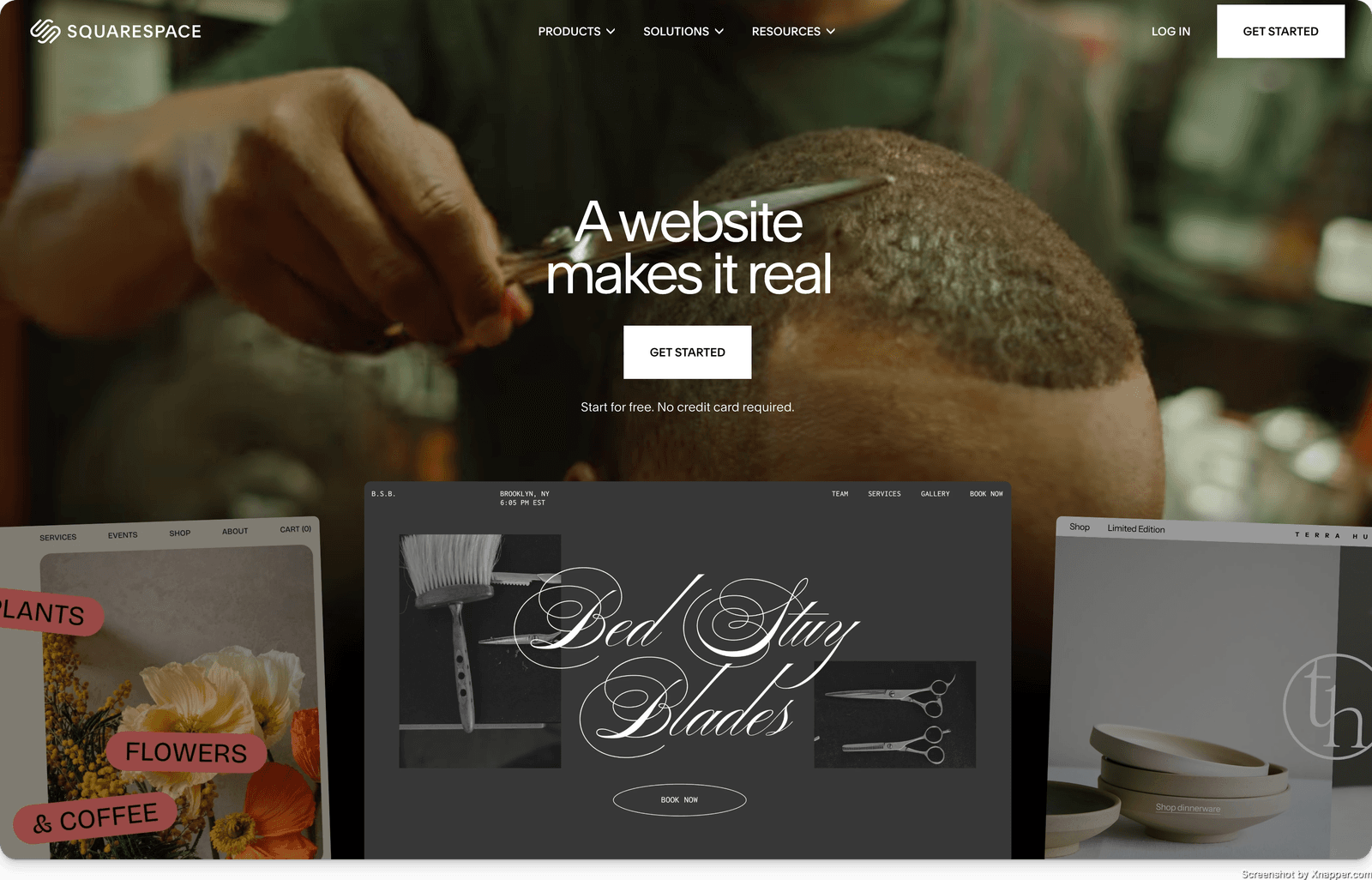
The result? Over 1.4 billion possible design combinations, each one unique to your inputs. But here’s the key difference between Blueprint AI Builder and most other AI website tools: you’re not handing over all creative control. At every step, you make the design decisions. The AI curates and recommends; you choose.
Squarespace was named one of TIME’s Best Inventions of 2025 specifically for Blueprint AI, and according to their data, more than half of all new Squarespace customers now start their sites with Blueprint rather than picking a template. That’s a massive shift.
It’s worth noting that Squarespace recently updated the product name from “Blueprint AI” to “Blueprint AI Builder“, so if you see older articles using the previous name, they’re referring to the same tool, just the earlier version.
Blueprint AI Builder is part of what Squarespace calls Design Intelligence (their broader suite of AI) powered tools that includes brand identity creation, AI content generation, the new Beacon AI assistant, and more. I’ll cover the full ecosystem later in this article.
Try Squarespace (USE CODE FEISWORLD10)
Transparency Note
We partner with brands we trust and use daily. If you sign up using our link, it helps support the channel at no extra cost to you. You can check out our dedicated hub here.
Why Your Online Presence Matters More Than Ever in 2026
Before I get into the walkthrough, I want to share something that shapes how I think about every website I build — and why I believe tools like Blueprint AI Builder matter far beyond just “having a website.”
We’re living through a fundamental shift in how people discover and evaluate brands, businesses, and individuals. The first thing you see when you type a question into Google now is an AI Overview. People are asking ChatGPT for recommendations, prompting Gemini for the best tools, and using AI agents to research purchases and partnerships. ChatGPT alone has 800 million weekly active users, processing over 2 billion queries a day.
Here’s what that means for you: if your brand only exists on social media and paid ads, you are increasingly invisible to AI.
Large language models don’t just crawl keywords, they learn from context. They absorb data from blog posts, podcast transcripts, YouTube tutorials, Reddit discussions, and yes, your website. They build an understanding of who you are and how relevant and trustworthy you are in your space.
I’ve started calling this Contextual Footprint Optimization: the practice of building your brand’s presence across the platforms and content types where AI systems learn. And your website is the foundation of that footprint. It’s the one platform you fully own, can update for life, and that serves as a primary source document for AI.
This is especially critical in 2026 because the nature of work is changing. We’re watching traditional 9-to-5 roles get restructured by AI automation, particularly in knowledge work. The people who will thrive aren’t necessarily the ones with the fanciest resumes, they’re the ones with the strongest, most visible personal brands. When a potential client, employer, partner, or AI system looks you up, what do they find?
If the answer is “not much,” that’s a problem. And it’s a problem that a well-built website can start solving in a single afternoon.
This is why I get excited about tools that lower the barrier to getting online. Not everyone has the budget for a custom web designer. Not everyone has 10 years of Squarespace experience. Blueprint AI Builder closes that gap in a way I haven’t seen before.
Now let me show you exactly what the experience looks like.
My Step-by-Step Experience Building a Site With Blueprint AI Builder
I decided to build a test consulting site from scratch to give you a real, unfiltered look at the process. I went to squarespace.com/templates and clicked “Try Blueprint AI Builder.”
The entire process took me about 8 minutes. Here’s what happened at each step.
Choose Your Topic
The first screen asks: “What’s your site about?” You get a search field with industry categories — Real Estate & Properties, Construction & Maintenance, Apparel, Travel, Consulting, Health, Beauty, Marketing, and more.
I selected Consulting since that closely mirrors a lot of the service-based work we do at Feisworld. The moment you make this selection, Blueprint AI Builder starts tailoring everything that follows to your industry.
My take: This is a simple but important step. The topic you choose influences the AI’s recommendations for page structure, copy tone, and section layout. If you’re a freelancer or creator, don’t overthink it — pick the closest match and know you can customize everything later.
Set Your Goals
Next, you tell Blueprint what you want your website to do. The options include: Build community, Collect donations, Get appointments, Offer a contact form, Promote a physical business, Publish a blog or other media, Sell products, Sell services, Send invoices, Sell access to group events, Sell memberships, Showcase work/expertise, Sell on-demand videos, and Sell online courses.
I checked Get appointments, Offer a contact form, Publish a blog or other media, Sell products, and Send invoices — a realistic set for a consulting business that also sells digital products and content.
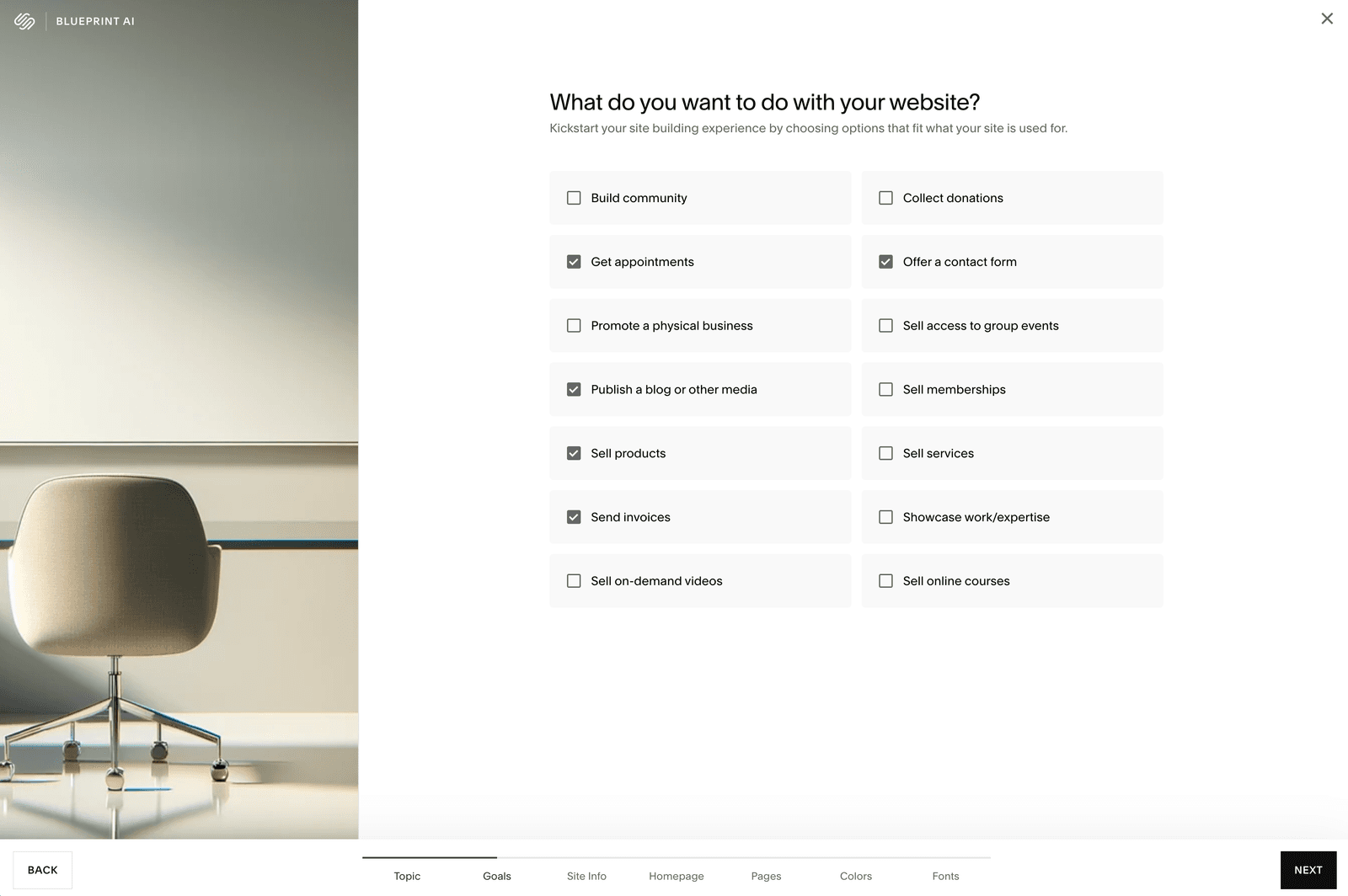
My take: This is where Blueprint starts getting smart. The goals you select directly shape which homepage sections and pages the AI recommends in the next steps. Check everything that’s relevant — you can always remove features later, but it’s easier to start with more and pare down.
Build Your Homepage
This is where things get genuinely impressive. Based on my topic and goals, Blueprint AI Builder presented a live homepage preview on the left side of the screen, with a checklist of recommended sections on the right: Intro section, Products section, Services section, Appointments section, Digital Products section, About section, Social section, Forms section, and Footer section.
Each section comes marked as “Recommended” based on your goals, and you can check or uncheck as many as you want. I kept Intro, Services, About, Forms, and Footer.
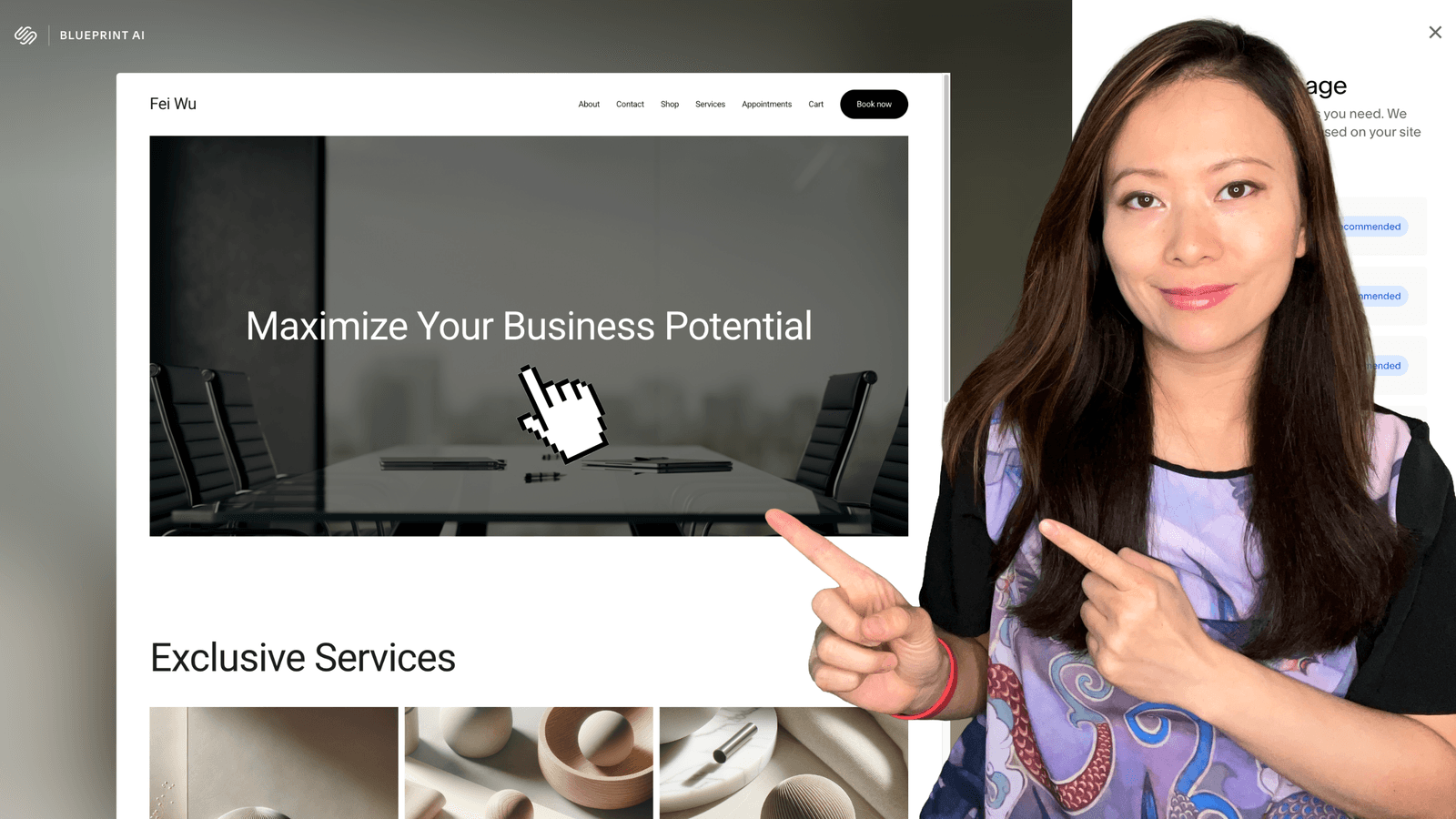
What surprised me was how polished the preview looked immediately. The AI generated a hero section with the headline “Maximize Your Business Potential,” placed navigation items across the top (About, Contact, Shop, Services, Appointments, Cart), and even added a “Book now” call-to-action button — all based on my earlier selections. The Services section displayed three service tiers with placeholder pricing and descriptions.
My take: This step is where Blueprint AI Builder earns its keep. Instead of staring at a blank page or trying to figure out which template has the right section layout, you’re building a homepage like an actual architect — selecting the building blocks you need, seeing the result in real time, and adjusting on the fly. For anyone who has ever been paralyzed by a blank Squarespace editor, this is a game-changer.
Add Pages to Your Site
After the homepage, Blueprint recommended a full set of pages based on my goals: Homepage (required), About, Contact, Shop, Services, and Appointments. There was also an optional Course page, which I left unchecked.
The preview showed all three pages side by side — the Homepage with the design I’d built, an About page with a “Who we are” section and placeholder bio image, and a Contact page with a ready-to-use contact form. You can click through each one to preview the layout.
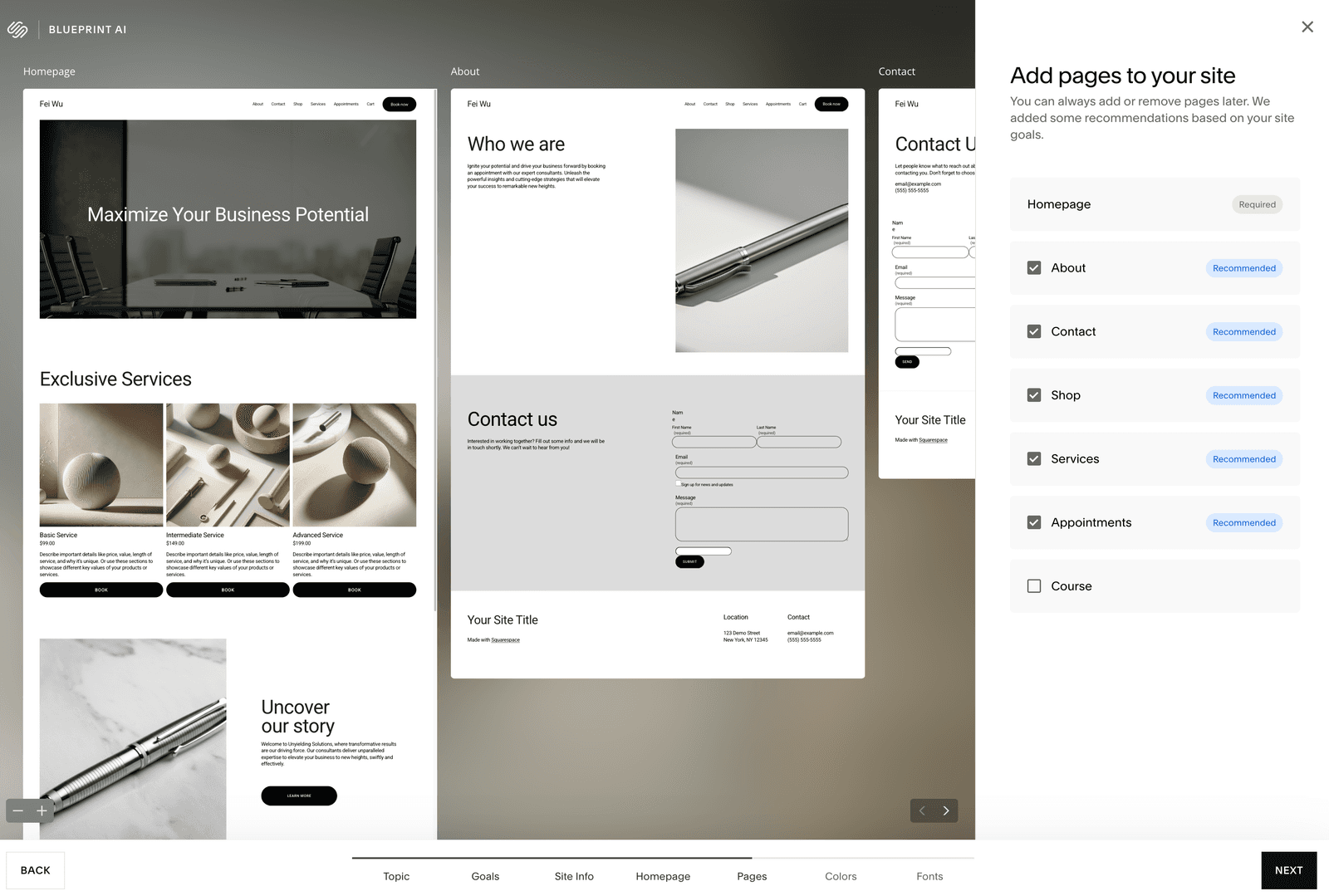
My take: I loved that the About and Contact pages were already pre-populated with structure and copy direction. In my experience building client sites, the About page and Contact page are the two that cause the most procrastination. Having a starting framework, even with placeholder text, removes so much friction.
Choose Colors and Fonts
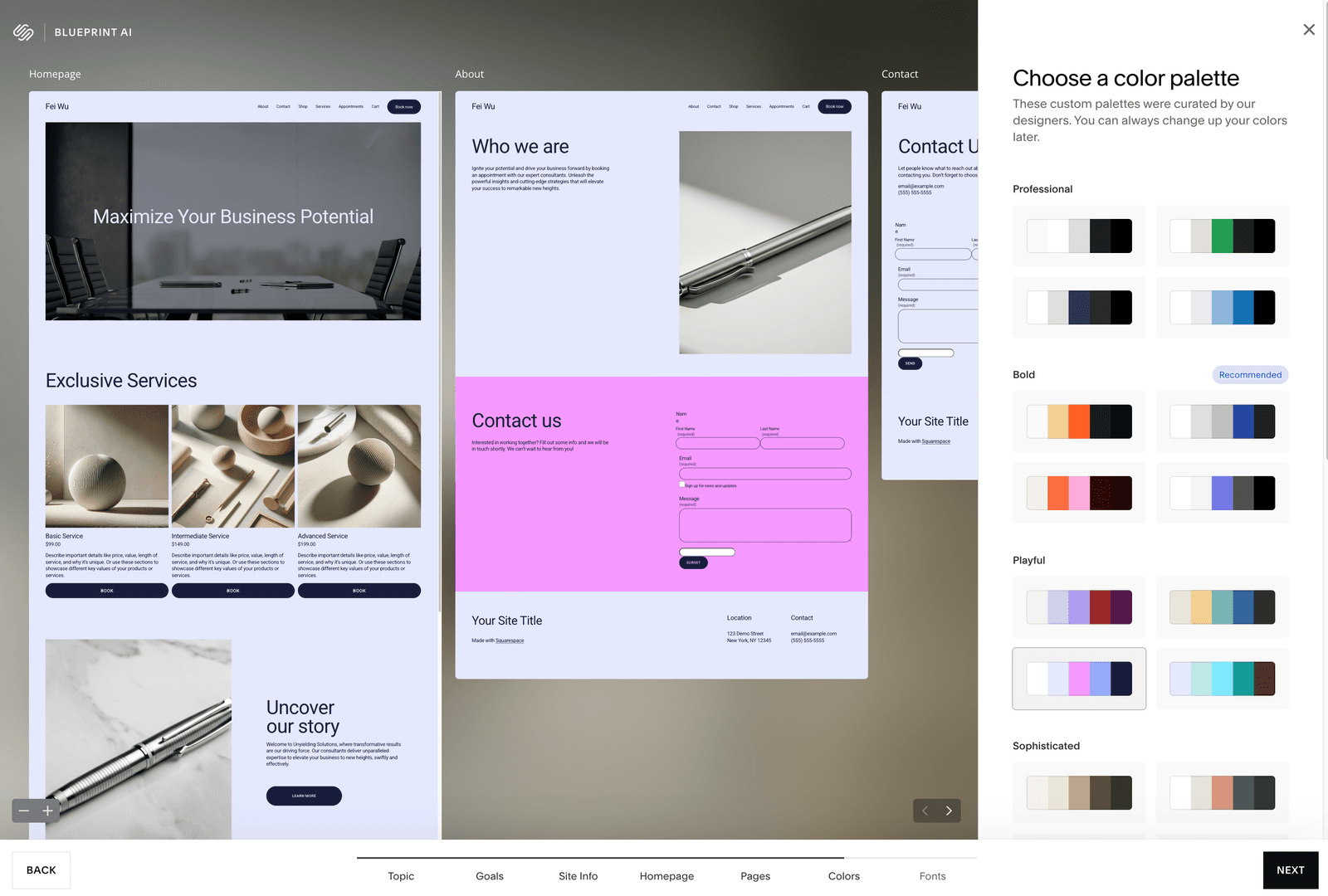
The final two steps let you choose a color palette and font pairing. Both are organized by personality categories that match the brand personality you selected earlier: Professional, Bold, Playful, Sophisticated, Friendly, and Quirky.
For colors, I saw curated palettes within each category — four-color swatches that updated the live preview in real time as I clicked through them. I experimented with the pink Playful palette just to see the range (the Contact page turned hot pink — fun for the right brand, not for consulting), then settled on a Bold palette with deep navy and clean whites.
For fonts, the same personality categories applied. The Bold category recommended a strong, uppercase sans-serif pairing that transformed the entire site’s feel. The live preview updated instantly — headings went bold and commanding, body text stayed clean and readable.
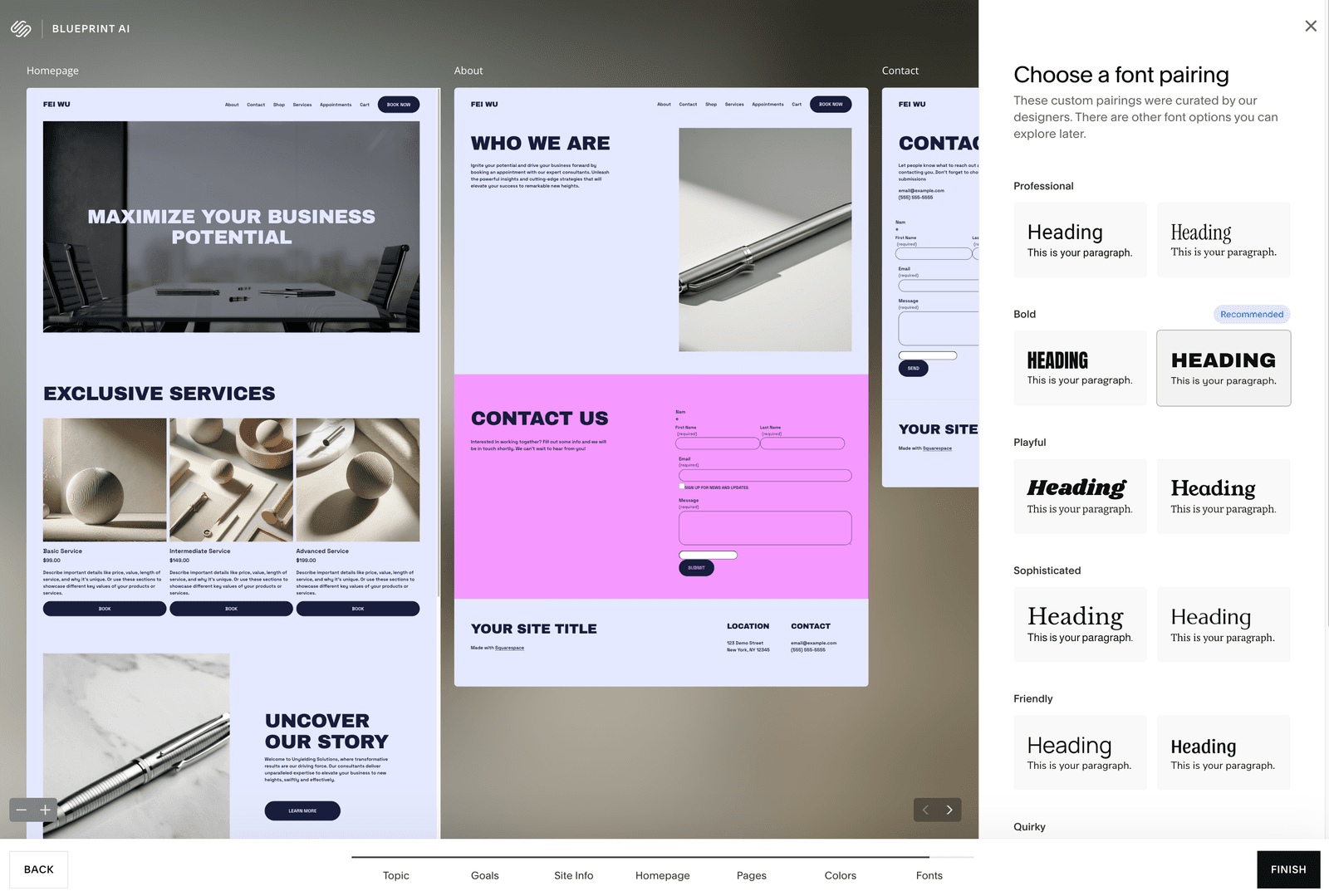
I clicked Finish, and Blueprint AI Builder generated my complete site in a few seconds.
My take on colors and fonts: This is where Squarespace’s 20+ years of design expertise shows up. Every palette and font pairing works. There are no bad options. I’ve seen beginners spend hours agonizing over font choices on other platforms — here, you can’t go wrong, and the real-time preview gives you immediate confidence.
The Final Result
After Blueprint AI Builder finished generating, I landed in the full Squarespace editor with a complete, multi-page website ready to customize. The dashboard showed all the management tools I’m familiar with — Pages, Styles, Assets, SEO/AIO, Products & Services, Scheduling, Invoicing, Email Campaigns, Analytics, and more.
The desktop view was polished: bold navy header, “Maximize Your Business Potential” hero with a professional conference room image, clean navigation, and a prominent “Book Now” button. When I toggled to mobile view, the responsive design was already handled — the Services section stacked cleanly with clear pricing and booking buttons.
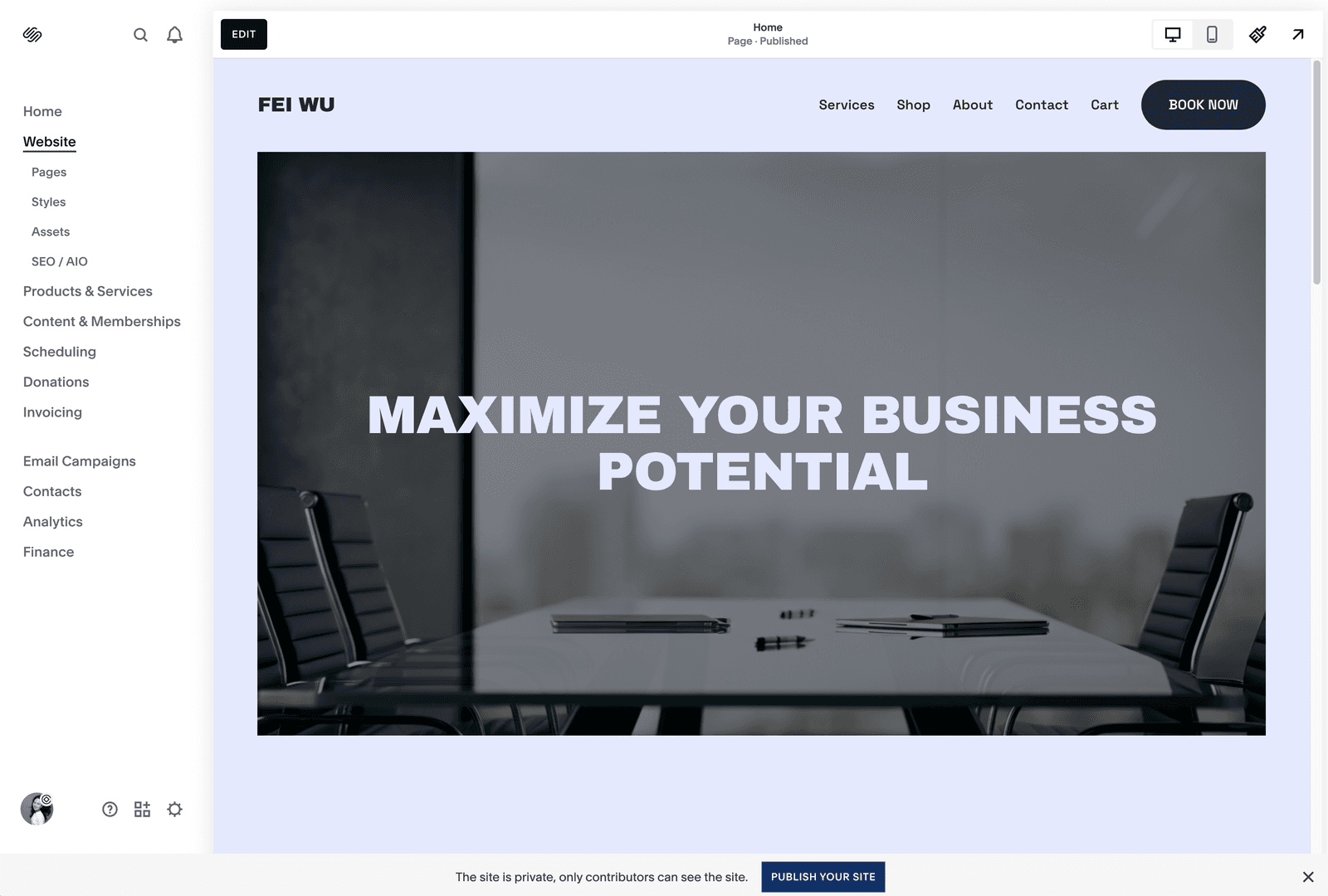
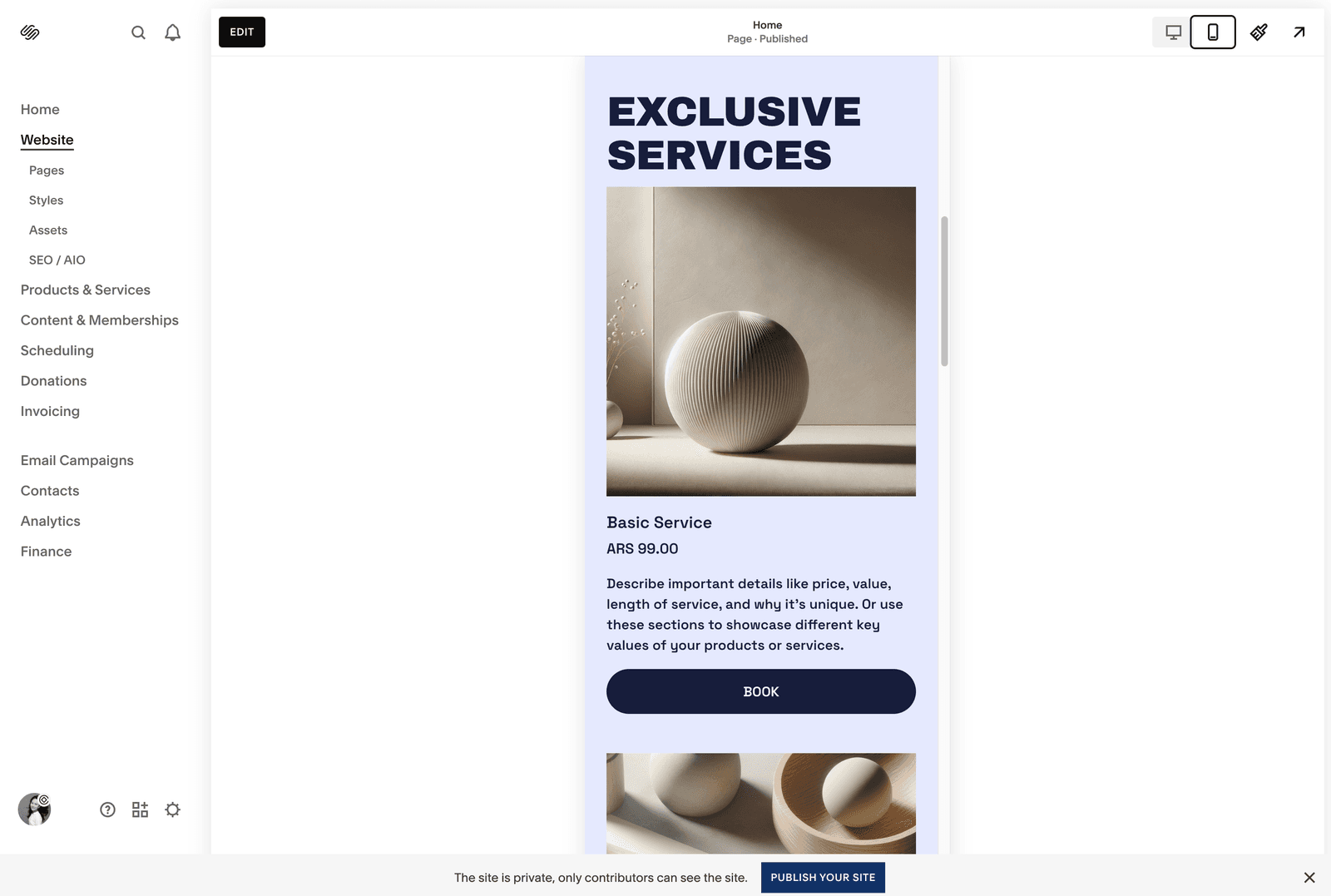
My take: From start to finish, the process took about 8 minutes. The site that came out the other end is genuinely something I would be comfortable showing a client as a “first draft.” It’s not ready to publish as-is — you’ll want to replace the stock images with your own photos, rewrite the placeholder copy, and adjust details — but the structural foundation and design direction are solid.
To put this in context: when I build a new Squarespace site from a template for a client, the initial setup (choosing a template, setting up pages, configuring navigation, adjusting basic styling) typically takes me 2–3 hours. Blueprint AI Builder compressed that into minutes.
What I Loved About the Process
After 10+ years on Squarespace, here’s what genuinely impressed me about Blueprint AI Builder:
- You’re in control the whole time. Unlike some AI website builders that take a prompt and spit out a complete site (take it or leave it), Blueprint AI Builder keeps you in the driver’s seat at every step. You choose the sections, the pages, the colors, the fonts. The AI curates; you decide. It feels collaborative, not automated.
- The design quality is consistently high. This is where Squarespace’s legacy really shines. Every color palette, every font pairing, every section layout has been curated by professional designers. There are no ugly options. I’ve tested other AI builders where the output looks… generic. Blueprint’s results look like a designer touched them, because designers did — they just designed the system, not each individual site.
- Real-time previews eliminate guesswork. Being able to see your color and font choices reflected instantly across your homepage, About, and Contact pages simultaneously is something I wish every website builder offered. It removes the anxiety of making irreversible decisions.
- The AI-generated copy is surprisingly useful. The placeholder text wasn’t lorem ipsum — it was industry-relevant copy that gave a realistic sense of what the finished site would feel like. For consulting, it generated headings like “Maximize Your Business Potential” and service descriptions with pricing tiers. It’s not publish-ready, but it’s a much better starting point than a blank text box.
- Everything is editable after. This is crucial. Blueprint AI Builder doesn’t lock you into anything. Once you’re in the editor, you have full access to Squarespace’s Fluid Engine — the same drag-and-drop system I’ve been using for years. Custom CSS, third-party integrations, advanced styling — it’s all there.
What Could Be Better
In the interest of being honest — and because I think it helps you make a better decision — here are the areas where Blueprint AI Builder could improve:
- Desktop only for now. You can only use the Blueprint AI Builder on desktop. Given how many entrepreneurs work from their phones and tablets, this is a limitation worth noting. Your finished site is fully mobile-responsive, but the building process requires a computer.
- English only (for now). The guided experience is currently available only in English. Squarespace has indicated they plan to expand language support, but if you need to build in another language, you’ll want to start with a template instead and use the editor.
- Stock images need replacing. The AI-generated images are polished and professional, but they’re stock. For a consulting site, the conference room imagery was appropriate but impersonal. The first thing I’d do before publishing is swap in real photos — of yourself, your team, your actual work environment. This is where your brand personality lives, and no AI can replicate it.
- No hands-on AI chat interface yet. Squarespace has teased a conversational chat feature for Blueprint AI Builder where you could describe what you want in natural language and let the AI build it. That would be a significant upgrade. For now, the process is guided but not conversational.
Blueprint AI Builder vs. Traditional Squarespace Templates
One question I get constantly from clients: “Should I use Blueprint AI Builder or just pick a template?”
Here’s my framework after testing both extensively:
- Choose Blueprint AI Builder if: You’re starting completely from scratch and don’t have a strong visual direction yet. Blueprint walks you through the decisions one at a time, which prevents decision paralysis. It’s also ideal if your site needs multiple functional goals (blog + store + appointments + contact) because it builds the page structure around those goals.
- Choose a template if: You’ve seen a specific Squarespace template that matches your vision almost exactly. With 190+ templates in the library, you might find one that’s 90% perfect out of the box. In that case, starting from the template and customizing is faster than building from Blueprint.
My recommendation for most people: Start with Blueprint AI Builder. You can always change your mind later — Squarespace makes it easy to switch layouts, add or remove pages, and completely restyle your site from the editor. But Blueprint gives you a more personalized starting point than any single template can.
How Blueprint AI Builder Compares to Other AI Website Builders
I’ve tested several AI website builders over the past year for various client projects. Here’s how Squarespace’s offering stacks up against the main competitors:
- Squarespace Blueprint AI Builder excels at design quality and creative control. The five-step guided process keeps you involved in every decision, and the curated design options mean the output always looks professional. The tradeoff is that it’s less “hands-off” than some competitors — if you want to describe your business in a sentence and get a complete site, other tools do that faster.
- Wix AI takes a more automated approach — you answer questions and it generates a full site. It’s faster to get a first draft, and Wix has more AI tools baked in (AI text generator, AI image tools). But in my experience, the design quality is more variable. Some outputs look great; others feel generic and template-driven.
- Hostinger AI Builder is the budget option. Extremely simple to use and very affordable, but the customization ceiling is lower. Fine for a basic business presence, but if you want to grow into a more sophisticated site, you may outgrow it.
- Framer produces the most design-forward output for creative portfolios and landing pages, but it has a steeper learning curve and is more oriented toward designers than everyday business owners.
My verdict:
For creators, entrepreneurs, small business owners, and anyone who values design quality and wants a platform they can grow with over years — Squarespace with Blueprint AI Builder is the strongest all-around choice. It’s not the cheapest, and it’s not the most automated, but the combination of design quality, creative control, and long-term platform depth is unmatched
The Bigger Picture: Design Intelligence and Squarespace’s AI Ecosystem
Blueprint AI Builder isn’t a standalone feature — it’s part of Squarespace’s broader Design Intelligence suite, which has been expanding rapidly since its launch in September 2024. Here’s what else is in the ecosystem:
- Beacon AI is Squarespace’s 24/7 AI business assistant. It can help you with tasks, generate reports, and streamline workflows directly from your dashboard. Think of it as having a virtual assistant built into your website platform.
- AI Content Generation lets you create and refine copy anywhere on your site. Click the AI icon in any text area, describe what you need, and it generates content tailored to your brand personality. You can also highlight existing text and ask the AI to simplify, lengthen, or rewrite it. I’ve found this most useful for meta descriptions and product copy — two things that most people procrastinate on.
- AI Product Composer generates detailed product listings from a description or image. If you’re setting up an online store, this can dramatically speed up the listing process.
- Brand Identity stores your brand’s tone, voice, color preferences, and personality so that AI-generated content stays consistent across your entire site.
- AIO Scanner is an AI-powered audit tool that reviews your site for areas of improvement. It ties into the SEO/AIO section of your dashboard — I noticed this in my editor sidebar during the test build.
- Squarespace GPT lets you start building a site directly from ChatGPT. You describe your business in the ChatGPT interface, and it generates a preview before sending you to Blueprint AI Builder to finalize. Similarly, a Perplexity/Comet partnership (launched October 2025) provides website-building support through Perplexity’s browser.
Why this matters for your brand
The integration of AI tools across the entire Squarespace platform means that building a website is just the beginning. The same AI that helps you design your site can also help you write your content, manage your products, and optimize for search — including the new world of AI-powered search I described earlier. This is a genuine competitive advantage for Squarespace as a platform.
Pricing: What You Actually Pay
One of the best things about Blueprint AI Builder: it’s completely free to use on any Squarespace plan. There’s no premium tier or AI surcharge. You can even use it during the 14-day free trial (no credit card required) to see the full experience before committing.
Here’s the current Squarespace pricing structure:
- Personal — $16/month (billed annually): Best for simple personal sites and portfolios. Includes all core features, Blueprint AI Builder, and a free custom domain for your first year.
- Core — $23/month (billed annually): Squarespace’s recommended plan for most users. Includes everything in Personal plus 0% transaction fees on products sold through the site. This is the plan I recommend for anyone selling products or services.
- Plus and Advanced plans scale up to $99/month for businesses that need advanced analytics, lower credit card processing rates, and enterprise features.
All plans include unlimited bandwidth, SSL security, 24/7 customer support, and the full suite of Squarespace AI tools.
Use code FEISWORLD10 at checkout for 10% off your first payment on any new plan.
Try Squarespace (USE CODE FEISWORLD10)
Who Is Blueprint AI Builder Best For?
Based on my testing and a decade of building Squarespace sites for clients, here’s who I think will benefit most:
- Entrepreneurs and small business owners who need a professional website but don’t have the budget (or patience) to hire a designer. Blueprint AI Builder gets you 80% of the way there in minutes. The remaining 20% — your photos, your copy, your brand’s personality — is the part only you can provide.
- Content creators building a personal brand. As I discussed earlier, your website is the foundation of your Contextual Footprint — the collection of online signals that teach AI systems (and human audiences) who you are and what you’re about. If you’re a podcaster, YouTuber, writer, or coach, you need a home base that you own. Social media platforms can change their algorithms overnight. Your Squarespace site is yours.
- Freelancers and consultants who want to showcase services, enable booking, and look professional. The consulting-focused setup I walked through in my test is a great example — the AI recommended all the right pages (Services, Appointments, Contact, Shop) without me having to figure out the information architecture.
- Anyone who has been putting off building a website. If you’ve been telling yourself “I’ll get to it when I have time to learn web design” — this is your sign. Blueprint AI Builder removes the learning curve. If you can answer five questions about your business, you can build a website.
Tips From a 10-Year Squarespace User
Before you dive in, here are some lessons from my years of building on this platform:
Replace every stock image before you publish
The AI-generated images are fine as placeholders, but your brand is defined by real visuals. Use your own photos, or invest a few hours in a professional photoshoot. The difference is night and day.
Don’t skip the SEO settings
After Blueprint AI Builder generates your site, go into each page’s settings and write custom page titles and meta descriptions. Squarespace’s AI can help generate these — use the AI text tool in your SEO/AIO settings panel. This is foundational for both traditional search and AI discoverability.
Set up your brand identity early
In the Squarespace dashboard, you can configure your brand’s tone, voice, and personality. Do this right after your site is generated — every piece of AI-generated content from that point forward will be more consistent and on-brand.
Think about your site structure for AI discoverability
Implement FAQ schema, review schema, and article schema on your pages. Add an FAQ section to your key pages (AI systems love pulling from Q&A formats). If you want to go further, look into the emerging LLMs.txt protocol — it’s like robots.txt, but specifically for guiding how AI crawlers interact with your content.
Internal linking matters more than ever
As you build out blog posts and pages, link between them intentionally. This helps both Google and AI systems understand the relationships between your content and your expertise. If you publish a tutorial about Squarespace ecommerce, link to your services page. If you write about booking appointments, link to your scheduling page.
Check your mobile view before publishing
Blueprint AI Builder generates responsive sites, but you should still toggle to mobile view in the editor (there’s a phone icon in the top-right toolbar) and make sure everything looks clean on smaller screens. Over half of all web traffic comes from mobile devices.
Frequently Asked Questions
Is Squarespace Blueprint AI Builder free?
Yes. Blueprint AI Builder is included at no additional cost on every Squarespace plan, including during the 14-day free trial. You only pay when you’re ready to publish your site on a custom domain.
Do I need design or coding experience to use Blueprint AI Builder?
No. The entire process is guided — you’re selecting from curated options at each step, not writing code or making design decisions from scratch. If you can answer basic questions about your business, you can use Blueprint AI Builder.
Can I customize my site after Blueprint AI Builder generates it?
Absolutely. Once Blueprint generates your site, you have full access to Squarespace’s Fluid Engine editor. You can change layouts, add or remove pages, swap images, edit text, add custom CSS, install third-party integrations, and customize every element of your design.
How is Blueprint AI Builder different from picking a Squarespace template?
Templates are pre-designed starting points — you browse a library and choose one that fits. Blueprint AI Builder assembles a completely custom design from Squarespace’s curated component library based on your specific goals, industry, and style preferences. With over 1.4 billion possible design combinations, the result is unique to you.
Can I use Squarespace Blueprint AI Builder for an online store?
Yes. During the goals step, select “Sell products” or “Sell services” and Blueprint will include e-commerce sections and pages in your site design. Squarespace’s e-commerce features include product listings, payment processing, inventory management, and shipping — all built into the platform.
How does Squarespace compare to Wix and other AI website builders?
Squarespace stands out for design quality and long-term platform depth. Wix offers more AI automation upfront, while Hostinger is the most budget-friendly option. For anyone who values design aesthetics and wants a platform they can grow with over years, Squarespace is my top recommendation.
Does Blueprint AI Builder work on mobile devices?
Currently, the Blueprint AI Builder guided experience is available only on desktop. However, the website it generates is fully mobile-responsive, and you can edit your site from the Squarespace mobile app after the initial build.
What is Squarespace Design Intelligence?
Design Intelligence is Squarespace’s overall AI technology suite, which includes Blueprint AI Builder, Brand Identity tools, AI content generation, Beacon AI (a business assistant), and the AIO Scanner. It combines 20+ years of Squarespace design expertise with AI to help users build and manage professional websites.
How long does it take to build a site with Blueprint AI Builder?
The guided Blueprint AI Builder process takes about 5–10 minutes. Customizing the generated site with your own content, images, and copy will take additional time — typically a few hours to a full day depending on how much content you have ready.
Why does having a website matter for personal branding in 2026?
AI systems like ChatGPT, Gemini, and Perplexity learn about brands and individuals from web content. Your website serves as a primary source document — a foundation for your “Contextual Footprint” that influences whether and how AI recommends or references you. In a world where traditional career paths are shifting and personal brands are becoming essential, your website is the one platform you fully own and control.
Feisworld’s Take
I’ve built more Squarespace sites than I can count over the past decade. I’ve watched the platform evolve from a beautiful-but-rigid template system to a genuinely flexible, AI-enhanced website builder that can serve everyone from solo freelancers to growing businesses.
Blueprint AI Builder is the most significant improvement to the Squarespace onboarding experience I’ve seen. It doesn’t replace the depth and power of the full editor, and it shouldn’t. What it does is solve the hardest problem in website building: getting started.
For years, the biggest barrier to getting online hasn’t been cost or technical skill, it’s been decision paralysis. Which template? What layout? How many pages? What colors? Blueprint AI Builder guides you through each of those decisions with professional-grade curation, and the result is a site that looks and feels custom-built.
Because it is.
If you’re a creator, entrepreneur, or small business owner, I believe building a strong online presence is the single most important investment you can make right now. Not just for SEO, not just for credibility. But for the new AI-powered discovery landscape that’s reshaping how every person, brand, and business gets found, evaluated, and chosen.
Your website is the foundation. Blueprint AI Builder makes laying that foundation faster and more accessible than ever.
Ready to try it yourself? Start your free Squarespace trial with Blueprint AI Builder →
Use code FEISWORLD10 for 10% off any new plan.
You might also enjoy…
- A Beginner’s Guide to Selling Your First Digital Product on Squarespace
- Squarespace Acquires Google Domains: What To Do Now?
- Best Google Domains Alternatives (After Squarespace)
- Acuity Scheduling: Our Favorite Scheduling Automation Tool
- How to Build a Brand in 2026 (And Get ChatGPT, Gemini, and AI to Mention You)

Written by
Fei WuFei Wu is the founder and CEO of Feisworld Media, a Massachusetts-based digital media company helping brands get discovered by people and by AI. An Adobe Global Ambassador and brand partner to ElevenLabs, Synthesia, and 50+ other tech and AI companies, she hosts the Feisworld Podcast (400+ episodes, 500K+ downloads — guests have included Seth Godin, Steve Wozniak, Chris Voss, and Arianna Huffington) and co-created the documentary Feisworld: Live Your Art on Amazon Prime. Fei writes for CNET, Lifehacker, and PCMag, and her work has been featured in Forbes, Harvard Business Review, and WIRED. She has been publishing on the internet since 2014 — long before AI discoverability had a name.
View all posts by Fei Wu→Stay updated
Weekly insights on content, AI, and digital media.