The phrase “vibe coded” makes me wince a little.
Not because I think it is useless. I understand why people use it. It describes something real: sitting with an AI coding tool, describing what you want, watching code appear, testing it, changing the prompt, and moving faster than you could have moved a few years ago. That part is real, but incomplete.
When someone looks at the new Feisworld site and says, “Was this all vibe coded?”, I know what they are really asking. They are asking whether this was a “one-prompt redesign”. Whether AI made the decisions. Whether the site is pretty on the outside and fragile underneath. Whether we replaced mature WordPress plugins with custom systems because it sounded exciting.
Those are fair questions. The answer is no. And also, AI was everywhere. That tension is the point of this article.
We used AI heavily during the Feisworld migration. We used it for code scaffolding, debugging, content audits, curation passes, stress tests, comparison tables, diagram planning, SEO research, adversarial reviews, and the boring work that humans are very good at avoiding (and get tired about!). Some nights I left agents running while I slept, then came back in the morning with coffee and a suspicious face.
But AI did not decide what Feisworld should become. It did not decide which plugin jobs were worth replacing. It did not decide what Fei’s voice should sound like. It did not decide which old pages deserved redirects, which affiliate links carried trust, or which schema claims were safe to publish.
Those were human calls, and I am more convinced of that now than I was when we started.
This is Article 7 in our Feisworld site migration series. In Article 1, I explained why we rebuilt the site for AI brand visibility. In Article 2, I showed why WordPress became the writing source while Ops, Turso, Next.js, and Vercel became the public publishing system. In Article 3, I covered the AI-assisted content audit. In Article 4, I mapped the WordPress plugin jobs we moved. In Article 5, I explained why affiliate links became operational data. In Article 6, I showed how YouTube, podcast, blog, and search signals became one editorial workflow.
This article asks the question we had to answer after the excitement faded: when should you build custom tools with AI, and when should you use a plugin, a SaaS product, or a simpler workflow that already exists?
The Short Version
Here is the answer I would give another creator, founder, or content-heavy brand.
Use AI-assisted web development when the work is specific to your workflow, strategically important, and reviewable by people who can maintain it. Use plugins and existing platforms when the problem is common, solved well, and not central enough to justify owning the whole system.
That sentence is less exciting than “AI can build anything now,” and more useful.
AI has changed the build-vs-buy math. It is now possible for a small team to build internal tools, dashboards, content workflows, and custom interfaces that would have been too expensive before.
I do not want to overread one vendor report, but Retool’s 2026 build-vs-buy research points in the same direction we felt during this migration: more teams are replacing some SaaS tools with custom builds, and many expect to build more internal tools in 2026.
That tracks with what we experienced. There were parts of the Feisworld migration where AI made custom work reasonable for our team size. Not free. Not automatic. Reasonable.
But the old build-vs-buy question did not disappear. It changed shape. The question is no longer only “Can we build this?”
The better question is “Should we own this after it works?”
What AI Actually Did for Us
I want to be specific because “AI helped us build the site” can mean almost anything now.
For Feisworld, AI helped in three main places.
It helped with repetition: comparing old WordPress behavior against the new public rendering layer, auditing 15+ years of content for broken blocks and plugin residue, and finding patterns I would have missed after the 200th old post. Trust me, we missed things already when doing all of this manually on our earlier migration from Squarespace to WordPress.
It helped with exploration: trying layouts, buttons, dashboard states, and responsive variations with v0 by Vercel before we committed to a direction.
And it helped with pressure testing: drafting possible fixes, writing repetitive scripts, proposing tests, and acting like a second reviewer when I asked it to be difficult.
That is a lot. It is also not the same as handing the site to AI.
The biggest value was speed through repetition. AI could hold a boring pattern longer than I could. It could compare many posts. It could produce three versions of a layout. It could suggest a migration script. It could write a first pass at a test. It could notice that a phrase appeared in too many old pages. It could act like a second reviewer when I asked it to be difficult.
That last part mattered more than I expected. We did not only ask AI to help. We asked other AI models to attack the work. Find the lazy claim. Find the broken assumption. Find the security risk. Find the place where the sentence sounds like a press release. Find the place where the diagram looks good until the text wraps on export.
I like AI much more as an opponent reviewer than as a cheerleader.
What AI Could Not Decide
AI could not decide what Feisworld believes! That sounds philosophical, but it became practical every day.
Should WordPress stay as the authoring source? Should every WordPress edit become public immediately? Should an old partner page redirect, return 410, or stay live as history?
Around those questions sat the rest of the migration: Turso snapshots, schema, affiliate trust, author pages, stale posts, old images, source removals, and what Feisworld should say now.
AI can propose answers. It can be helpful. It can even be persuasive. But the final decision belongs to the people responsible for the brand.
That is especially true for a site like Feisworld, because the archive is not generic content. It is public memory. Fei’s interviews, tutorials, essays, brand collaborations, podcast episodes, videos, and courses are connected to real people and real work. A tool can summarize that archive, but it does not carry responsibility for it.
That is why our migration kept coming back to human approval. WordPress can change. AI can suggest. Ops can surface the issue. But the public site should move only after review.
I am not trying to write the definitive “what is vibe coding” article. That lane is noisy. The better question for us was more practical: when is custom work worth the responsibility?
Why This Was Not a One-Prompt Redesign
There is a fantasy version of AI web development where you write one prompt, wait a few minutes, and receive a polished, fast, secure, SEO-ready, brand-aware, content-aware, future-proof website.
That is not what happened. Our migration took a little over two months. It involved the main Feisworld Media repo, the Feisworld Ops repo, WordPress, Next.js, Turso, Vercel, old content, redirects, images, schema, and a lot of unglamorous review.
We used AI to move faster through pieces of that work. But the project still needed technical direction.
WordPress staying as the writing source was a decision. So was rendering approved Turso state, moving review into Ops, and deciding which plugin jobs belonged somewhere else.
Schema had to describe visible facts, not old plugin habits. Redirects had to serve readers, not nostalgia. Affiliate links had to match what we would still recommend. None of that came from one prompt.
That “someone” was not a prompt.
It was Fei’s editorial standard, my technical background, the business realities of Feisworld Media, and a lot of mornings where I opened the agent output and thought, “Okay, show me exactly what you changed.”
The Plugins We Did Not Replace Just to Be Clever
I keep coming back to this because it is easy to misunderstand custom work. We did not replace plugins because we wanted a trophy case of custom tools.
Plugins are valuable. A good plugin gives you maintainers, updates, documentation, edge cases, support threads, compatibility fixes, and thousands of users finding problems before you do. That is not a small thing. When you build your own version, you lose that shared maintenance surface.
That is why in the plugin article, I tried to be clear: we did not clone WP Rocket, Optimole, Rank Math, or ThirstyAffiliates feature by feature. We moved jobs to clearer owners.
Performance moved toward Next.js and Vercel because the public site was no longer a WordPress theme. Image handling moved toward Vercel Image Optimization and Blob because the image problem became resilience work. Public schema and metadata moved toward Next.js and Ops because structured data is a public claim. Affiliate links moved into Ops because they became partner and editorial data, not just redirects.
If a creator has a traditional WordPress site and needs basic redirects, an SEO plugin, forms, a backup plugin, and a simple affiliate link manager, I would not tell them to build an Ops dashboard. I would tell them to use good tools, understand what each one owns, and keep the setup maintainable.
The job changed for us. So the owner changed. That is the only reason custom work made sense.
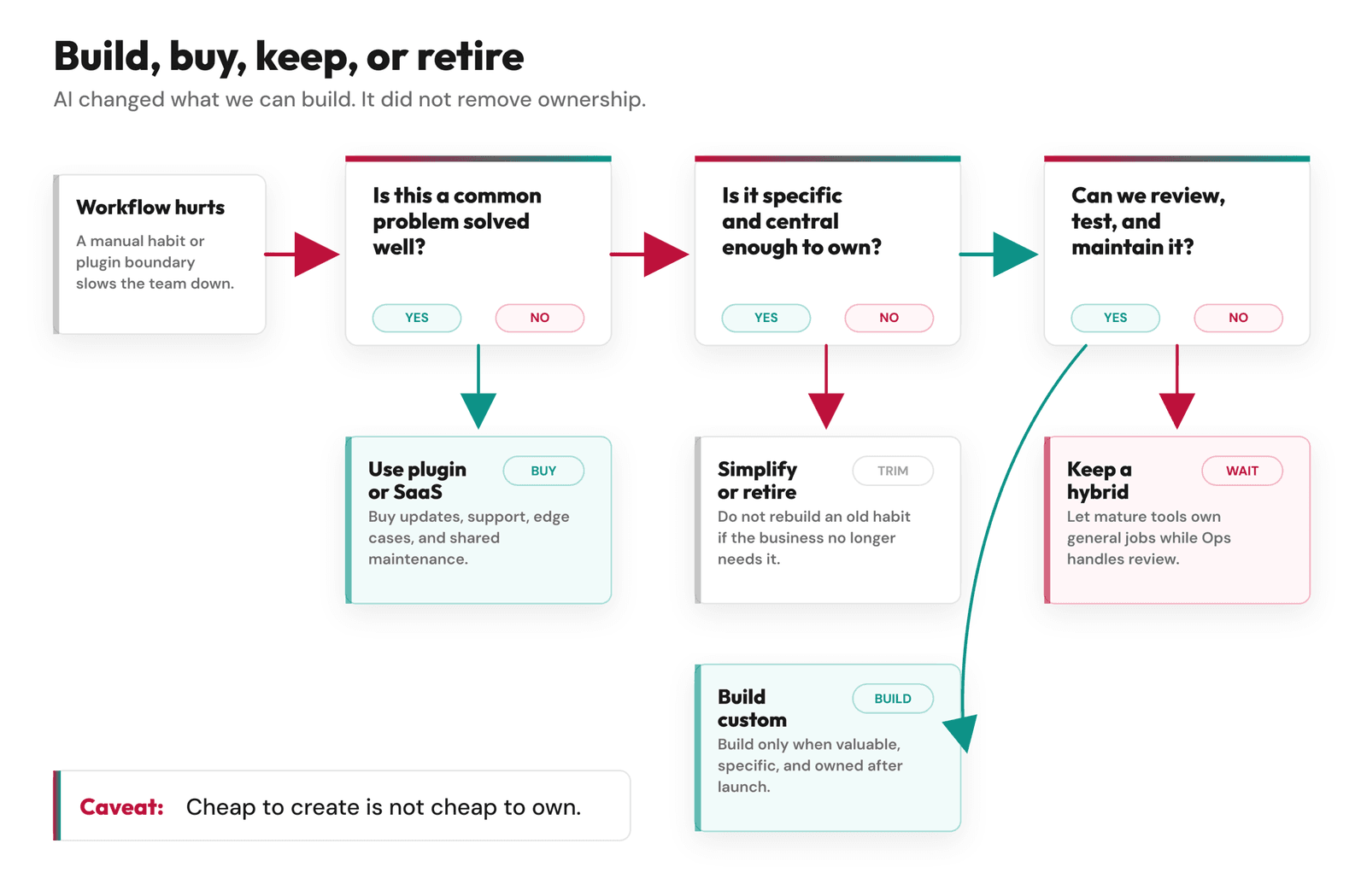
Build, Buy, Keep, or Retire
Here is the decision framework I wish people used more often: buy the boring advantage, build only the specific workflow, keep a hybrid when a mature platform solves the general layer, and retire what belonged to an older version of the business.
WordPress stayed because it is still good for writing, drafts, revisions, and source media. Ops became custom because our review queue, affiliate links, content monitor, and approved publishing flow were too specific to hand back to a plugin stack. Next.js and Vercel became the public layer because performance, previews, routing, and image handling were no longer WordPress theme problems.
The most underrated option is retire.
A migration is a rare chance to say, “We do not need to keep pretending this old thing is still part of the company.”
Cheap to create is not cheap to own.
The Vibe Coding Risks We Took Seriously
I do not want to make AI-assisted development sound safer than it is.
Security research and developer surveys are not gentle here. Veracode’s 2025 GenAI Code Security Report summary says AI-generated code samples introduced security vulnerabilities, many linked to OWASP Top 10 categories, in 45% of tested cases.
The Stack Overflow Developer Survey 2025 says 84% of respondents are using or planning to use AI tools in their development process, but it also says 66% are frustrated by AI solutions that are almost right but not quite, and 46% actively distrust AI tool accuracy.
Google’s 2025 DORA research is more balanced. It reports widespread AI adoption and perceived productivity gains, but it also frames AI as a mirror and multiplier of the system around it.
That is the right way to think about it. AI can make a healthy workflow faster. It can also make a weak workflow produce more weak output.
The risks we watched for were not abstract:
- False confidence: code that looks reasonable but hides a bad assumption.
- Context loss: an agent forgetting a migration rule, source-of-truth boundary, or prior decision.
- Security gaps: unsafe routes, loose auth assumptions, secret handling mistakes, or unreviewed dependencies.
- Rabbit holes: spending hours fixing the wrong thing because the AI made the wrong frame feel plausible.
- Voice flattening: making Feisworld’s content more optimized and less human.
- Maintenance debt: shipping something that works once, then becomes mysterious six weeks later.
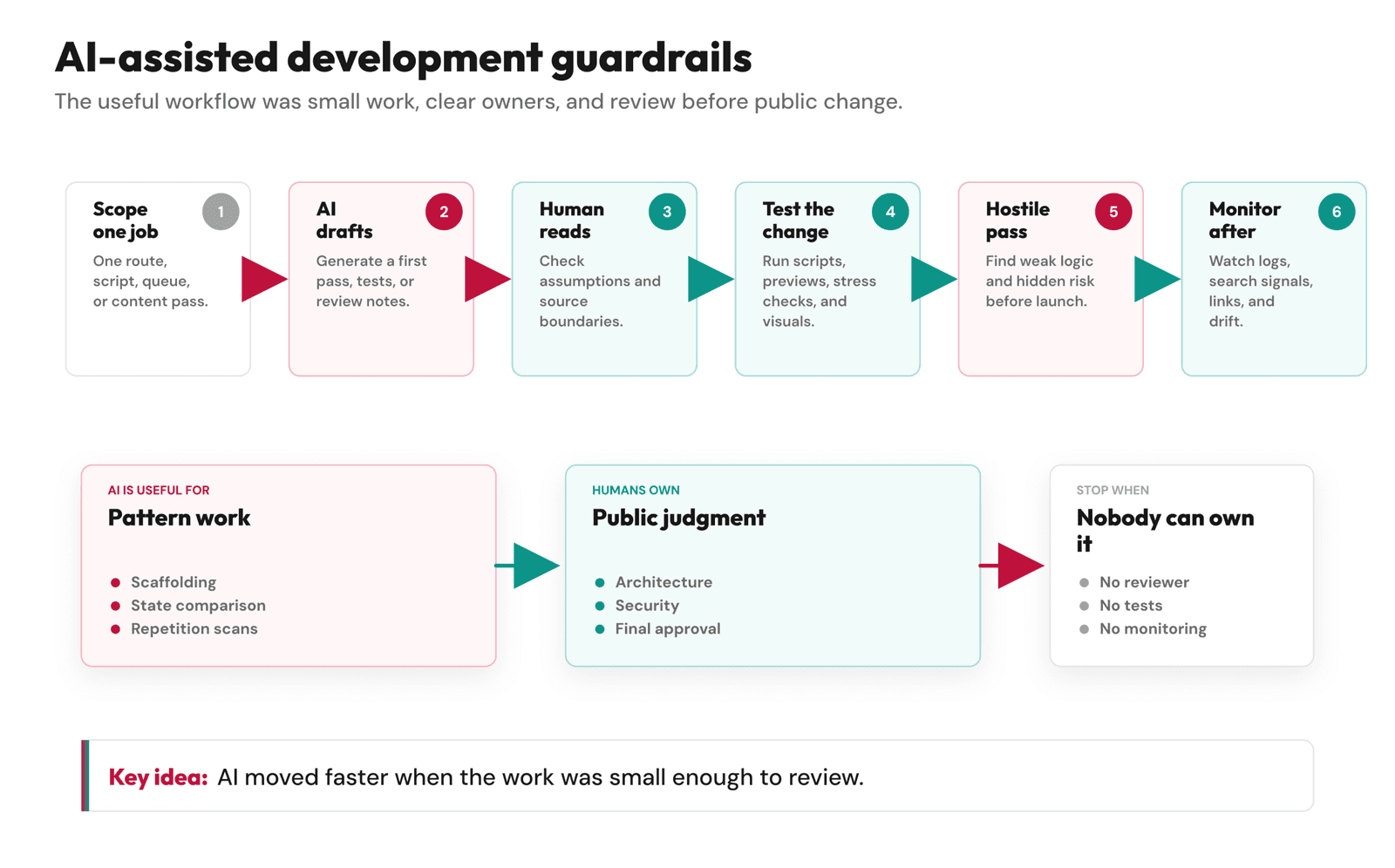
The answer was not to avoid AI. The answer was to shrink the work into reviewable pieces.
How We Kept the Work Reviewable
The most useful rule was small work. Not small ambition. Small changes.
One script. One route. One diagram. One curation pass. One review queue behavior. One redirect decision. One metadata policy. One testable claim.
That mattered because AI can get lost when the context gets too wide. Humans can too, but humans are more likely to notice they are confused. AI often keeps walking with confidence.
One small scar from this project: more than once, AI grouped a real content problem correctly and then suggested a fix that was too broad. It looked efficient. It would also have rewritten more than the specific issue in front of us.
The more practical cost was not a dramatic failure. It was the number of small checks we had to own. A curation pass could find the right pattern and still touch too much. A diagram export could look finished until text collided inside a card. A redirect change could be correct technically and still feel wrong editorially. None of that is heroic. It is just maintenance, and it is now ours.
So we used a workflow that looked boring from the outside. Define the job in plain English. Decide who owns the public truth. Let AI propose an implementation or review path. Check the code, not just the answer. Run tests, previews, or spot checks. Keep backups before data operations. Use Ops review before public changes.
When the risk was high, we asked another model to be hostile. Then we documented what changed so the next person was not forced to guess from an old chat thread.
That is less glamorous than the one-prompt story, and it is why the work held together.
Where AI Was Better Than Us
There were places where AI was plainly better than doing the work by hand.
Content curation is the obvious one.
In our earlier Squarespace to WordPress migration, the redesign worked, but the legacy content cleanup was mixed. Some old blocks stayed ugly. Some pages still carried strange formatting. We could fix only what we saw, and after enough manual cleanup, every old post starts to look like a small argument with your past self.
This time, AI helped us run curation passes across the archive. It could find patterns, report inconsistencies, group issues, and suggest targeted fixes. We still had to decide what to do. But the detection work became much more realistic.
Design exploration was another area. v0 helped us see layout ideas quickly and test interface directions before committing too much. It was especially useful for buttons, layouts, responsive states, dashboard pieces, and visual iteration, which we covered in I Created One of the Most Modern Content Sites with v0.
AI was also useful for adversarial review. I could ask for a hostile read of a draft, a diagram, an architecture choice, or a launch plan. The best feedback was not always correct, but it usually forced a sharper decision.
That is the version of AI I trust most: not the final answer, but the reviewer that makes the next question sharper.
The Decision Checklist
If you are deciding whether to build custom tools with AI, I would ask these questions before opening the coding agent.
- Is the problem common and already solved well?
- Does the tool you already have fail because of missing features, or because your workflow is unclear?
- Would a plugin, SaaS product, or spreadsheet solve 80% of the need?
- Is this workflow close to revenue, trust, safety, publishing, or customer experience?
- Can you define the job in plain English?
- Can someone on the team review the code and architecture?
- Can you test it before it touches public users?
- Can you monitor it after launch?
- Can you maintain it when the AI agent is not in the room?
- What happens if it breaks quietly?
That last question is usually the one that tells the truth. If the custom system breaks quietly and nothing serious happens, maybe you can build it as a small experiment. If it breaks quietly and readers lose trust, partners get misrepresented, payments fail, security gets weaker, or important pages disappear from search, you need a higher standard.
And if nobody on the team can review or maintain the custom thing, I would not make it business-critical. AI can help you build the first version. It will not be accountable when the system gets confusing six months later.
The mistake I would avoid is building custom software because AI made it feel cheap. Cheap to create is not the same as cheap to own. A custom system needs maintenance. It needs tests. It needs backups. It needs someone who understands why it exists. It needs documentation that does not require the original chat thread to make sense. It needs a way to fail visibly.
For Feisworld, custom work was worth it where the workflow was central to the business and specific to our archive. Affiliate links, content monitoring, approval flows, redirects, metadata review, source removals, and media signal mapping all fit that category. I would not custom-build something just because it is possible. I would custom-build when the thing being built makes the brand easier to run, easier to trust, and easier to maintain over time.
What I Would Tell Another Small Team
Start smaller than your ambition.
If you want to use AI-assisted web development, do not begin with “rebuild the whole company website.” Begin with one workflow that hurts.
Maybe it is a content review sheet. Maybe it is an affiliate link inventory. Maybe it is a redirect map. Maybe it is a small internal dashboard that pulls Search Console data for your top 20 pages. Maybe it is a screenshot-ready report for a partner campaign. Maybe it is a simple page built with v0, then reviewed by a human before it becomes part of the site.
Let AI help you move faster, but do not let it blur the decision. If you cannot explain why the custom thing should exist after the first version works, do not build it yet.
That sounds conservative. Maybe it is. But after this migration, I trust conservative boundaries more than fast mystery.
FAQ
What is AI-assisted web development?
AI-assisted web development is the use of AI tools to help design, write, review, test, debug, or ship websites and applications. It can include coding assistants, design generators, agents, prompt-based UI tools, and review workflows. The useful version still includes human direction, code review, testing, and maintenance.
Is vibe coding safe?
It depends on what you are building and who is reviewing it. Vibe coding can be useful for prototypes, small tools, and early exploration. It becomes risky when AI-generated code touches security, payments, private data, publishing, redirects, customer workflows, or anything the team cannot audit and maintain.
Should I build custom software with AI or use a plugin?
Use a plugin or SaaS tool when the problem is common and the tool solves it well. Build custom software only when the workflow is specific, valuable, and worth maintaining. My quiet tie-breaker is this: if it breaks at 11 p.m., do we know who owns it and how to recover? For Feisworld, custom Ops made sense because affiliate links, content monitoring, redirects, and approval workflows had become part of our publishing system.
Can AI replace a developer for a website project?
AI can reduce the amount of repetitive development work, but it does not remove the need for technical judgment. The more your site touches SEO, security, data, integrations, performance, or business operations, the more you need someone who can review what AI creates.
What is the biggest risk of AI-generated code?
The biggest risk is not always that the code fails immediately. Sometimes the risk is that it works well enough to ship, but hides security issues, brittle assumptions, unclear ownership, or maintenance debt. That is why review, testing, backups, and monitoring matter.
When is custom software worth it?
Custom software is worth it when the workflow is central to the business, hard to express inside existing tools, and important enough to maintain. If nobody owns it after launch, a good plugin is usually better.
You might also enjoy…
- WordPress Plugin Alternatives on Vercel: WP Rocket, Optimole, Rank Math, and ThirstyAffiliates
- Affiliate Link Management at Scale: Why We Built Our Own System
- YouTube and Podcast SEO Workflow: How We Connected Video, Blog, and Search Data
- I Created One of the Most Modern Content Sites with v0
- Best AI Website Builders in 2026
- How to Build a Brand in 2026
- Work With Feisworld Media

Written by
Germán CeballosGermán Ceballos has worked with Feisworld Media since 2016 and serves as Editorial Director. He co-created and edited the documentary Feisworld: Live Your Art, has overseen the editorial direction of the podcast across 300+ episodes, and shapes Feisworld's coverage of AI tools, creator workflows, video production, and content strategy.
View all posts by Germán Ceballos→Stay updated
Weekly insights on content, AI, and digital media.
Keep Reading