Last year (2025), after the big announcement of Firefly including partner models, everyone was amazed, but also got confused. Which one is the best to use and when?
We went from having one reliable engine to having a dashboard full of options. FLUX, OpenAI, Runway, Ideogram.
I put them to the test back then, but one specific set of models caught my eye recently, mostly because of the hilarious code name, but also because of the bold promises on “logic.”
I am talking about Google’s Gemini models. Specifically, the ones Adobe has labeled “Nano Banana.”
This week, I decided to ignore everything else and go deep on just these two: Gemini 2.5 Flash (Nano Banana) and the beefier Gemini 3 (Nano Banana Pro).
I wanted to answer one specific question for my business: Is the expensive version actually 4x better than the cheap one? Here are the results.
The Contenders: Flash vs. Pro
Before we look at the images, we have to look at the “Credit Economy.” As business owners, we need to know what a click costs.
According to the latest 2026 pricing tables:
- The Challenger: Gemini 2.5 Flash Image (Nano Banana)
- Cost: 10 Generative Credits per generation.
- Promise: Speed, prompt accuracy, efficient drafting.
- The Heavyweight: Gemini 3 (w/ Nano Banana Pro)
- Cost: 40 Generative Credits per generation.
- Promise: High-quality professional grade, functional design, complex logic.
That is a massive difference. You can generate four images with version 2.5 for the price of one image with version 3.
So, does “Nano Banana Pro” earn its keep?
The Test: Logic and “Prompt Adherence”
I didn’t want to test these on simple prompts like “a sunset.” Any AI can do a sunset.
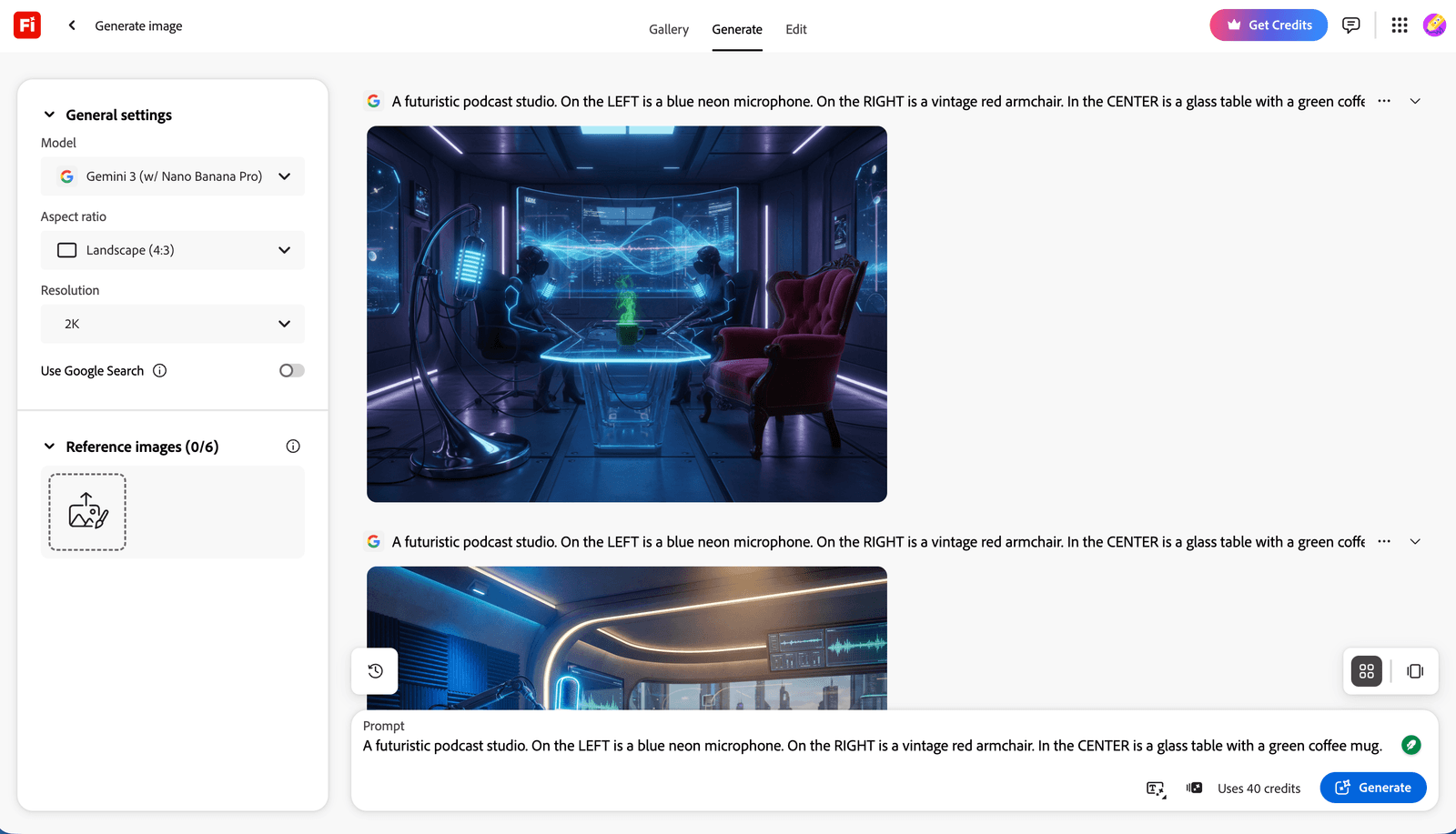
I tested them on Logic. Google’s models are famous for their reasoning capabilities, so I gave them a “Fei Wu Stress Test”, a prompt with specific spatial instructions.
> “A futuristic podcast studio. On the LEFT is a blue neon microphone. On the RIGHT is a vintage red armchair. In the CENTER is a glass table with a green coffee mug.”
Round 1: Gemini 2.5 Flash (10 Credits)
- The Experience: It was incredibly fast. I clicked generate, and boom, four options appeared almost instantly.
- The Result: The images were crisp and vibrant. It understood the “podcast studio” vibe perfectly.
- The Flaw: In two of the four images, it mixed up the colors. The chair was blue, or the microphone was in the center. It got the vibe right, but it struggled slightly with the strict geography of my prompt.

Round 2: Gemini 3 Pro (40 Credits)
- The Experience: It took a few seconds longer. You could feel the engine thinking.
- The Result: Precision. In almost every variation, the microphone was on the left (blue), the chair was on the right (red), and the mug was in the center (green).
- The Quality: Beyond just following instructions, the lighting was different. It felt less like “digital art” and more like a coherent, interior design render. The glass table had accurate reflections of the neon light.

The Verdict: When to Spend the Credits
After spending a week solely in the Google ecosystem inside Firefly, here is my decision matrix.
Use Gemini 2.5 (Nano Banana) when
- You are Brainstorming: If you are just trying to find a mood or a color palette, do not waste 40 credits. The 2.5 Flash model is one of the cheapest options in the entire Adobe ecosystem (tied with FLUX 1.1).
- Speed Matters: If you are live-demoing to a client or iterating rapidly, this is your tool.
- The Prompt is Simple: “A cyberpunk city” or “A cute robot.” It handles these beautifully for a fraction of the cost.
Use Gemini 3 (Nano Banana Pro) when
- The Prompt is Complex: If you need specific objects in specific places (e.g., for a storyboard or a specific product placement mock-up), the “Pro” brain is worth the extra cost.
- Reflections & Textures: I noticed Gemini 3 handles glass, water, and complex lighting interactions much better than the Flash version.
- It’s the “Final” Render: Use 2.5 to find the composition, then switch to 3.0 to generate the high-res asset you’ll actually publish.
Why This Matters for Creators
We are moving past the “Wow” phase of AI and into the “Utility” phase.
Having Google’s logic-based models available directly inside Firefly and Photoshop means I don’t have to leave my workflow to get a “smarter” image.
I love that Adobe is giving us the choice. Sometimes I want a Ferrari (Gemini 3), but sometimes I just need a reliable Honda Civic to get to the grocery store (Gemini 2.5).
My Challenge to You:
Go into Firefly today. Switch the model to Gemini 2.5 (Nano Banana). See how far you can push it for just 10 credits. You might find it’s the most efficient drafter you’ve ever hired.
Have you tried the “Nano Banana” models yet? Does the name make you hungry, or is that just me? Let me know in the comments!
Try Google Models in Firefly Now
You might also enjoy…

Written by
Fei WuFei Wu is the founder and CEO of Feisworld Media, a Massachusetts-based digital media company helping brands get discovered by people and by AI. An Adobe Global Ambassador and brand partner to ElevenLabs, Synthesia, and 50+ other tech and AI companies, she hosts the Feisworld Podcast (400+ episodes, 500K+ downloads — guests have included Seth Godin, Steve Wozniak, Chris Voss, and Arianna Huffington) and co-created the documentary Feisworld: Live Your Art on Amazon Prime. Fei writes for CNET, Lifehacker, and PCMag, and her work has been featured in Forbes, Harvard Business Review, and WIRED. She has been publishing on the internet since 2014 — long before AI discoverability had a name.
View all posts by Fei Wu→Stay updated
Weekly insights on content, AI, and digital media.
Keep Reading


